
Updated 11th December, 2025
Most creators don't stall because their ideas are weak; they stall because courses, communities, and payments are scattered across platforms they don’t control. When your audience has to jump between social feeds, third-party groups, and separate checkout links, engagement drops, completion rates suffer, and revenue becomes unpredictable.
A branded mobile learning app changes that by giving you one owned space where students consume content, join the community, and pay—directly from a native app on their phone. In this guide, we’ll break down the best mobile learning app platforms and what actually matters for creators who want control, not just another login.
You’ll see how a mobile-first, no-code builder lets you launch your own branded digital classroom for iOS, Android, and web in weeks, not months, while improving completion rates and building more stable subscription revenue under your own name.
Why a branded mobile learning app is essential for creators
The online education market is crowded, but creators who own their platform have a clear advantage. A branded mobile app shifts you from renting space on social platforms to owning your audience relationship.
Overcoming tool sprawl and algorithm risk
A mobile app built on Passion consolidates everything into one space. Your students download your app, access all content, join discussions, and make purchases without leaving. You control the distribution channel through push notifications that reach students directly, bypassing email filters and social feeds entirely.
Algorithm risk is real. Social platforms can throttle your reach overnight. With your own app, no policy change or account suspension cuts off access to your audience.
Boosting engagement and completion rates
Push notifications deliver timely reminders, celebrate milestones, and announce new content directly to students' devices. Offline access keeps learning going during commutes. In-app communities foster peer support and accountability.
We see creators on our platform achieve 15-30% higher completion rates within 90 days by combining push notifications with weekly challenges and community engagement.
Securing predictable recurring revenue
A branded mobile app supports subscription models that stabilize cash flow. Students subscribe monthly or annually for access to your growing content library and community.
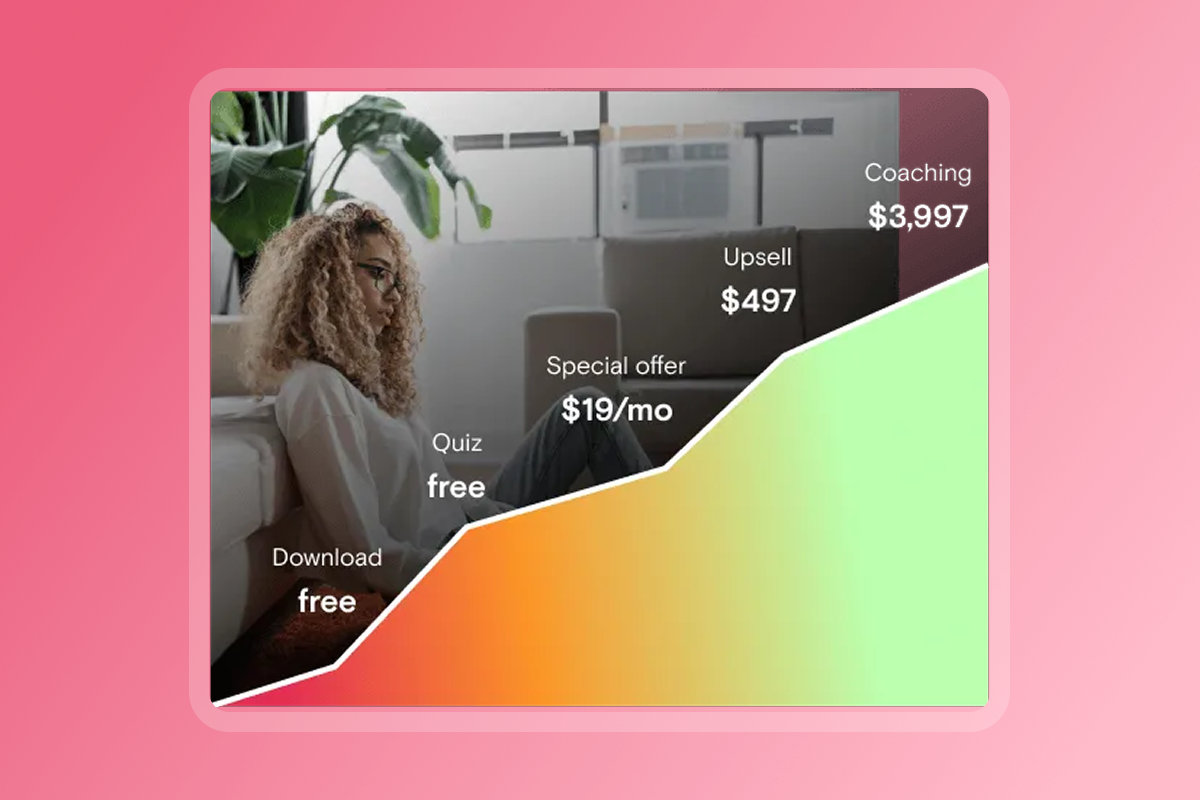
Mobile apps enable flexible monetization. Offer freemium access to build trust, then upsell premium tiers. Bundle coaching with group programs. Accept payments via web checkout or in-app purchases.
Creators shifting from one-time course sales to subscriptions typically see 10-20% MRR growth in 90-180 days as recurring revenue compounds.
What to look for in a mobile learning app platform
Choosing the right platform determines how quickly you launch and how well students engage.
True mobile-first experience (iOS, Android, web)
- Native apps matter: True mobile-first means iOS and Android apps students download from app stores, plus web access for desktop. Native apps provide offline content access, faster load times, and seamless device integration.
- Not just responsive websites: Web-only platforms feel clunky on mobile. Students abandon courses when navigation is awkward or videos buffer constantly.
Integrated community and engagement tools
- Built-in community spaces: Look for discussion forums, direct messaging, and group channels integrated into the app. The best platforms let you create public channels for general discussion and private channels for VIP members.
- Interactive features: Quizzes, goal trackers, and progress badges keep students motivated. Live Q&A sessions and polls boost real-time engagement.
Flexible monetization and payment options
Your monetization needs will evolve. Choose a platform supporting subscriptions, one-time purchases, bundles, and freemium access.
Understand fee structures:
- Web checkout gateways: typically 2-4% platform fees plus processor fees
- In-app purchases: Apple/Google take 15-30%
- External checkout: some platforms offer 0% platform fees
Balance convenience for students with cost efficiency for your business.
Ease of use and speed to launch
- No-code builders save time and money: Custom app development costs $30,000+ and takes months. No-code builders let you launch in weeks without hiring developers.
- Look for support: App store submission varies by platform. Some handle Apple and Google developer account setup for you. DIY submission can add 3-4 weeks to your timeline.
Comprehensive training and support
The technology is only half the equation. Look for platforms offering onboarding programs, playbooks, and active creator communities where you can learn from peers.
"Passion makes building your own e-learning app fast, simple, and stress-free. With their no-code, drag-and-drop platform, I was able to design, build, and launch a fully functional app in just a few hours—no tech experience required." - Rob M. on G2
Passion: Your branded mobile learning app solution
We built Passion as a no-code platform that lets you build, launch, and monetize your own branded mobile app for iOS, Android, and web without hiring developers.
Build your app fast with no code
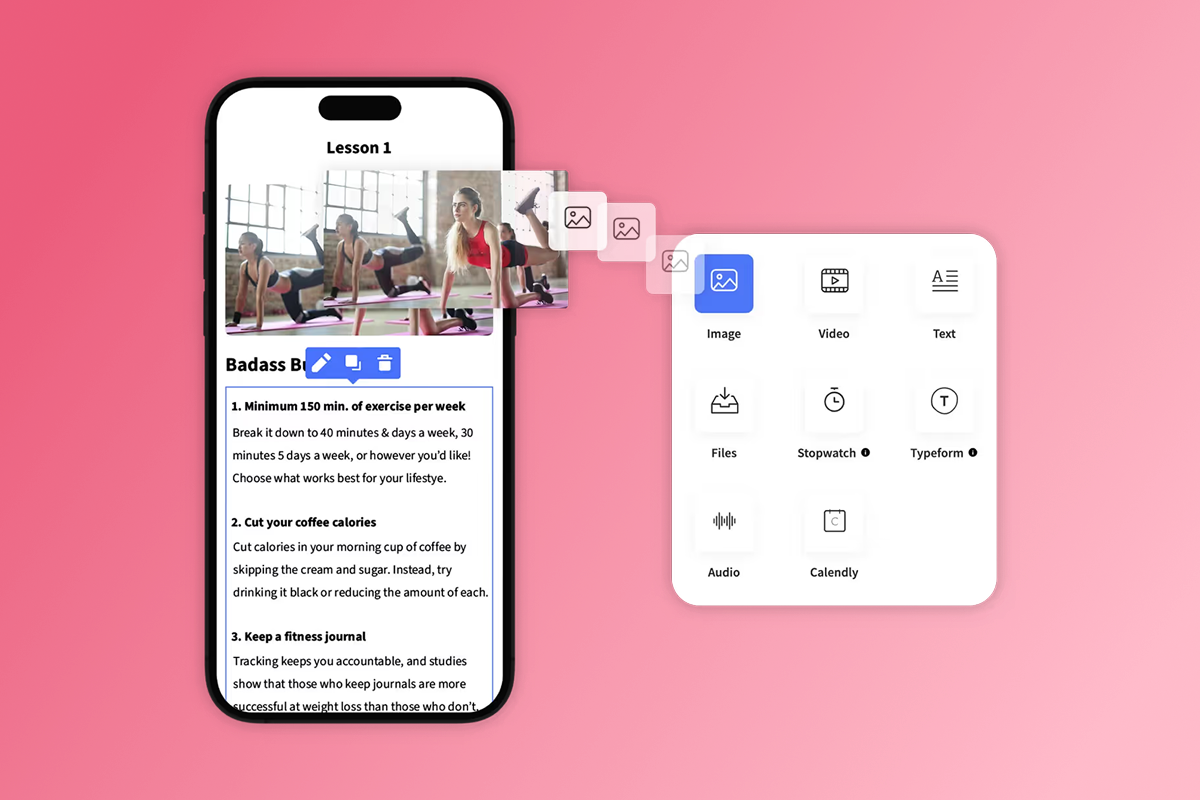
Our drag-and-drop builder lets you create your app in hours, not months. Pick a template, upload your content, and customize the design with your branding.
Content formats we support:
- Videos: MP4 or MOV with streaming and offline playback
- Audio: AAC or MP3 files for podcast-style lessons
- PDFs: Workbooks, templates, and reference guides
- Text: Written lessons with formatting and images
Organize content into courses with modules and lessons. Add quizzes, timers, goal tracking, and drip schedules to create structured learning paths.
We help you launch your web app first, typically within 2-4 weeks of starting setup. App store submissions for iOS and Android begin simultaneously, with apps typically live 3-4 weeks after web launch.
"They lay it out clearly and are available for support. The platform is easy to use with clear directions on what to do next. The number of features available are amazing, right down to tracking integrations built right in." - Michele D. P. on G2
Drive engagement with push notifications and in-app community
Push notifications are the engagement engine mobile apps provide that web platforms can't match. We let you send reminders for upcoming live sessions, celebrate when students complete milestones, and announce new content drops.
We see push notifications drive higher click-through rates than email because messages appear directly on students' lock screens. Target notifications to specific user segments based on their progress or subscription tier.
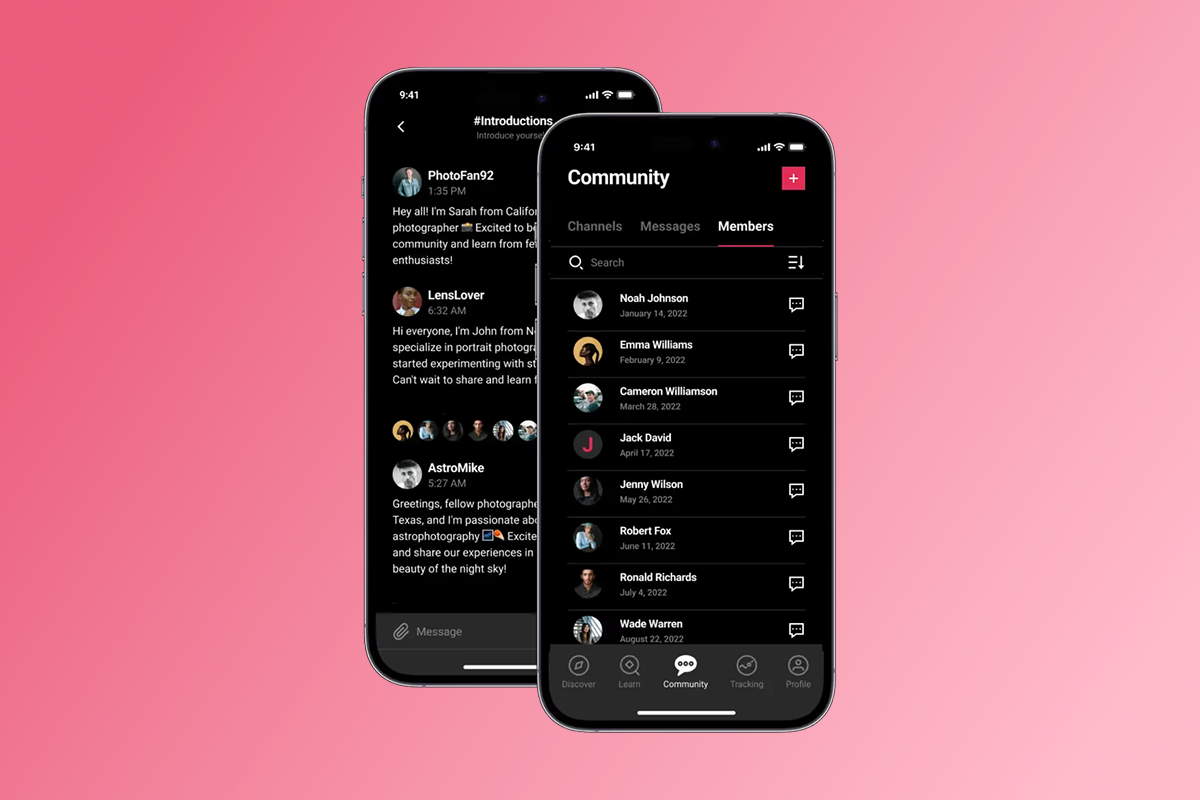
Our in-app community channels replace scattered Facebook groups with a branded space you control:
- Create unlimited public or private channels for onboarding, Q&A, or accountability challenges
- Members post photos, videos, and voice messages up to 5 minutes long
- Direct messaging between members or with you builds stronger relationships
- Moderate by tagging members, pinning important posts, and removing spam
- Offer DM access as a premium feature for VIP tiers
Monetize your expertise with flexible subscriptions
We support multiple monetization models so you can start simple and add complexity as you scale:
- Subscription options: Offer weekly, monthly, or annual recurring subscriptions. Bundle multiple courses and community access into membership tiers.
- One-time purchases: Sell individual courses or digital products for single payments. Good for high-ticket programs or standalone masterclasses.
- Freemium access: Give away foundational content to build trust, then gate advanced lessons behind paid tiers.
- Bundles and upsells: Package courses with coaching sessions, templates, or exclusive resources at premium price points.
Link community channels to pricing tiers so paying members get exclusive access to VIP discussions or direct messaging with you.

Transparent pricing and fees
Our pricing structure includes platform subscription fees plus payment processing fees that vary by method.

Platform subscription plans:
Payment processing fees:
- PassionPayments (web): 3.9% platform fee plus standard Stripe fees
- In-app purchases: Apple/Google retain 15-30%
- External checkout: 0% Passion fee when using supported external methods
Developer account fees:
- Apple Developer Program: $99/year
- Google Play Developer: $25 one-time
Choose web checkout for lower fees on bundles. Use in-app purchases for mobile convenience. Route high-margin sales to external checkout when feasible.
Real creator success stories
We've supported creators in launching 15,000+ apps with 2M+ paying app users across diverse niches.
Fitness trainers run 30-day challenges with push-driven accountability. Wellness coaches bundle meditation series with private community access. Skills educators in music and aerial arts offer structured learning paths with progress tracking.
"What I love about Passion is that it's not just a platform to create your own app – it also provides invaluable training on how to build and sell your course. It's more than just the tech; it's the know-how." - Mathilde N. on G2
We ranked No. 1,563 on the Inc. 5000 list in 2022, and our CEO confirmed we operate as a profitable 8-figure business as of September 2025.
How Passion compares to other mobile learning apps
Several platforms serve creators building digital classrooms. Here's how we stack up against common alternatives.
Mobile-first engagement vs. web-first focus
We build true mobile apps for iOS and Android. Students download your branded app from app stores and access content even when offline. Push notifications reach students directly on their devices.
Web-first platforms like Kajabi offer powerful marketing funnels but treat mobile as a responsive website. Students must open a browser and log in, creating friction.
Classplus also provides native mobile apps with offline access, but focuses heavily on institute management and live class delivery rather than community building.
Community management and ownership
Our in-app community features let you create unlimited public and private channels within your branded app. Members post photos, videos, and voice messages. You control moderation, link channels to pricing tiers, and offer direct messaging as a premium feature.
Classplus provides discussion forums and messaging for student-teacher interaction, focusing more on academic collaboration than standalone social communities.
Kajabi offers community features but they're primarily web-based rather than mobile-native. Many creators integrate with platforms like Circle, adding another tool to their stack.
Monetization flexibility and fees
We charge 3.9% on web transactions via PassionPayments plus standard Stripe fees. In-app purchases cost 15-30% to Apple/Google. You can use external checkout for 0% platform fees.
Classplus's transaction fees aren't publicly disclosed, with pricing customized based on institute needs.
Kajabi doesn't charge transaction fees but plans start higher ($149-$399/month) to offset this. Payment processing runs through web checkouts or in-app purchases in Kajabi’s mobile apps, handled by Stripe, Apple, or Google rather than Kajabi adding its own transaction fee..
Speed to launch and support
Our no-code builder and templates enable web app launches in 2-4 weeks. App store submissions begin immediately, with iOS and Android apps typically live 3-4 weeks later. Higher tiers include submission support.
Classplus builds customized apps but setup can be complex initially. The platform handles app deployment but timelines vary.
Kajabi's web-first approach means you can launch courses quickly without app store approvals.
"I like that there's an easy to follow system to not only build your App but also you Business. It makes you think about the fundamentals of your business so that you can create an app that's suited for your clients' needs." - Emmely C. on G2
Launch your branded app in 30-90 days: A creator's playbook
A structured launch plan turns your content into a revenue-generating app. Here's the realistic timeline.
Week 1-2: Content migration and app setup
- Days 1-3 - Platform setup: Set up your account and explore the platform. Watch our Passion Tutorial 2025 setup guide and join the creator community. Define your niche clearly.
- Days 4-7 - Content mapping: Map your existing content. Identify 8-12 core lessons that deliver a complete learning outcome. Organize them into 2-4 modules with clear progression.
- Days 8-14 - Upload and brand: Upload your first module. Add quizzes and goal trackers. Customize your app's branding with logo, colors, and fonts. Create one community channel for Q&A and write clear guidelines.
Week 3-4: Pricing, monetization, and app store submission
- Week 3 - Define pricing: Start with a simple structure like $29/month or $297/year. Create one free resource and one paid tier. Set up PassionPayments for web checkout. Calculate margins accounting for fees.
- Week 4 - Submit to app stores: Register your Apple Developer account ($99/year) and Google Play Developer account ($25 one-time). Upload app store assets like screenshots and descriptions. Submit for review while launching your web app immediately.
Month 2-3: Engagement strategies and growth
- Month 2 - Drive logins: Schedule push notifications twice weekly with specific prompts. Run your first 7-day challenge in a dedicated community channel. Post daily prompts and celebrate completions. Integrate Calendly or Typeform and gather feedback from early users.
- Month 3 - Analyze and scale: Track daily active users, completion rates, and revenue. Creators on our platform who combine push notifications with weekly challenges typically see 15-30% higher completion rates within this timeframe. Launch your second pricing tier with VIP community access or exclusive live sessions for $99-$199/month. Send push notifications when users haven't logged in for 7 days to reduce churn.
For more on creating engaging content, explore how digital coaches create explainer videos to keep students motivated.
Own your audience, own your future
Tool sprawl, algorithm risk, and unpredictable revenue don't have to define your creator business. A branded mobile learning app consolidates your content, community, and payments into one space you control.
After reviewing dozens of platforms, I believe owned audience platforms beat rented land every time. The best mobile learning apps combine true native mobile experiences with no-code builders, push notifications that reach students directly, and flexible monetization that supports recurring revenue.
We stand out by focusing on mobile-first engagement while handling the technical complexity of app development and submission. Our training and support go beyond features to teach you how to structure offers, launch successfully, and sell.
For creators ready to stop renting audiences and start owning relationships, a branded app isn't just a nice-to-have. It's the foundation for predictable growth and sustainable income.
Ready to launch your branded mobile learning app?
Stop juggling scattered tools and start building your owned platform today. We offer a 30-day money-back guarantee, giving you risk-free access to explore the platform and start building your app.
Want to see how creators in fitness, wellness, and coaching use our platform? Book a demo to explore real app examples and discuss your specific needs.
For more strategies on building sustainable creator businesses, explore our guide on online teaching strategies for predictable revenue.
Frequently asked questions
How long does it take to launch a mobile learning app using a no-code platform?
Web apps launch in 2-4 weeks. iOS and Android app store approvals typically add 3-4 weeks after web launch.
What are the transaction fees for mobile learning apps?
PassionPayments charges 3.9% for web transactions plus Stripe fees. Apple and Google retain 15-30% for in-app purchases.
Can I migrate my existing course content to a mobile learning app?
Yes. Upload existing videos, PDFs, audio files, and text content directly into lesson modules and reorganize as needed.
Do I need coding skills to build a mobile learning app?
No. Our drag-and-drop builder with templates requires zero coding experience to design, build, and launch apps.
How do push notifications improve course completion rates?
Push notifications reach students directly on their devices with timely reminders. Creators combining push notifications with community engagement see measurably higher completion rates within 90 days.
What's the difference between web-first and mobile-first learning platforms?
Web-first platforms offer responsive websites. Mobile-first platforms provide native iOS and Android apps with offline access, push notifications, and seamless device integration.
Key terms glossary
Branded mobile app: A mobile application for iOS and Android customized with a creator's own branding, logo, and content, distributed through app stores.
In-app purchases (IAP): Purchases made directly within a mobile app, subject to Apple/Google fees of 15-30%.
Push notifications: Direct messages sent to a user's mobile device from an app, even when the app isn't open, driving engagement and retention.
Freemium model: A pricing strategy offering basic content or features free to attract users, while reserving premium content for paying subscribers.
Tool sprawl: The inefficiency caused by using multiple disconnected tools for different business functions, requiring constant switching between platforms.
PassionPayments: Our web checkout gateway that charges a 3.9% platform fee plus standard Stripe processing fees.
No-code builder: A platform allowing users to create and launch apps using drag-and-drop interfaces and templates without writing code.
Monthly Recurring Revenue (MRR): Predictable revenue generated from subscriptions each month, providing stable cash flow for creators.