.png)

Updated January 29th, 2026
Why Move from Courses to a Creator Membership App?
The cycle is familiar: you launch a course, DMs flood in, Stripe pings, and you feel relief for two weeks. Then the spike flattens. You post more, run another challenge, and repeat. Revenue looks like a heart monitor, not a business.
The root problem is you're renting attention from platforms that throttle reach without notice. Your audience lives on their phones, but you're reaching them through email and Facebook groups you don't control. When you sell a course, you deliver access and hope students finish. Most don't.
A creator membership app changes the equation. You own the platform, the data, and the daily touchpoints. Push notifications reach members instantly; studies show retention rates are nearly 3x higher when users receive push notifications in their first 90 days. In-app community keeps them engaged between lessons. Subscriptions create predictable monthly recurring revenue instead of launch-dependent cash flow.
Passion.io's platform gives you iOS, Android, and web apps without writing code, so you consolidate content, community, and payments into one branded experience. Instead of scrambling for the next launch, you focus on retention and delivering value that keeps subscribers active.
Step 1: Define Your Recurring Offer and Pricing Tiers
Recurring revenue requires recurring value. You're not just charging for content; you're charging for access to a system that delivers results over time.
Structure your tiers to match different commitment levels:
Freemium tier ($0): Offer 1-2 teaser lessons and limited community access. This builds your funnel and lets potential members experience your teaching style before they pay.
Core membership ($29-49/month): Include all course content, full community access, push notification updates, and progress tracking. This tier becomes your primary revenue driver. Passion.io's monetization playbook shows fitness and wellness creators commonly price between these ranges depending on content depth.
Premium tier ($79-149/month): Add live group calls, exclusive community channels, faster support, and early access to new content. Premium members want closer connection and are willing to pay for it.
High-ticket tier ($199+/month or $997+ one-time): Include everything in Premium plus 1:1 coaching, direct messaging access, and personalized programs.
Real example: Spartan RAM created monthly tiers ranging from $97 to $297 and generates over $200,000 annually with approximately 180 subscribers. Savannah Bohlin grew to 250 subscribers at $22/month, creating $66,000 in annual recurring revenue through her holistic health app.
Start with two tiers at launch: a core membership and one premium option. Add complexity as you learn what members value most. Use Passion.io's pricing plans feature to configure subscriptions with monthly or annual billing cycles.
Step 2: Choose the Right App Builder for Your Business
Custom development costs $50,000-$150,000 and takes 6-18 months. Web-first course platforms give you a website but lack native mobile apps with push notifications. No-code app builders offer a faster, more affordable path.
Here's how the options compare:
Choose based on your priorities. Need native mobile with push notifications and in-app community features? Passion.io delivers without code. Most fitness coaches, wellness educators, and course creators choose no-code because speed matters. Check out Passion.io's platform demo to see the builder interface before committing.
"I have really enjoyed creating my passion app over the past year and half. I would not have been able to make my idea for an app come to life without the platform passion provides." - FitwithBrit on Trustpilot
Step 3: Build Your Branded App Without Code
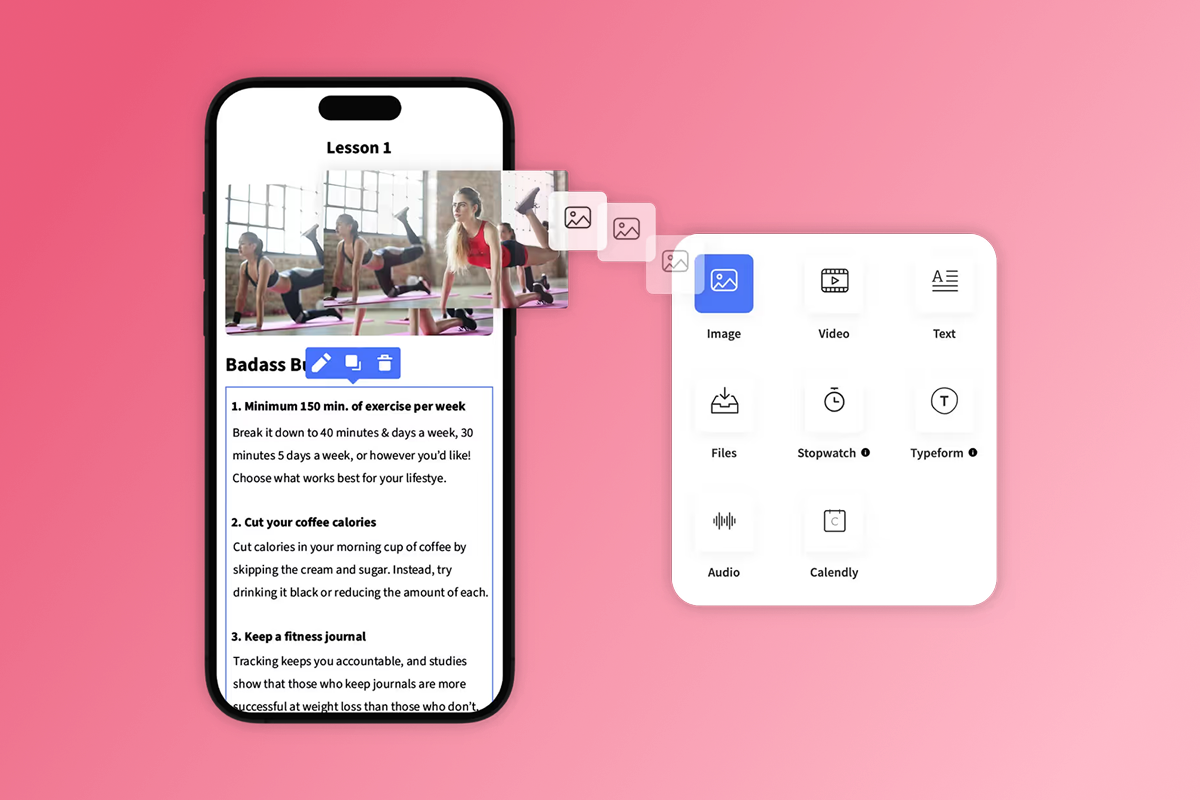
Building takes hours of setup work, not minutes, but requires zero programming knowledge. Passion.io's drag-and-drop course builder handles the technical infrastructure while you focus on content and branding.
The build process breaks into five stages:
- Select your template: Choose from fitness, education, wellness, or business coaching templates with pre-configured lesson structures, community channels, and pricing layouts. Customize everything to match your brand.
- Upload your content: Drag videos, PDFs, audio files, and text into lesson modules. Set up drip schedules, add quizzes, and configure offline downloads.
- Configure branding: Upload your logo, set brand colors, and customize fonts. Visual consistency builds trust and recognition.
- Build your community: Create channels for different topics, set up member profiles, and configure moderation settings. Check how to build an engaged community for setup details.
- Set up pricing and access rules: Connect each pricing tier to specific content and community channels. Availability selectors and paywalls control what each tier can view.
"Creating an App takes commitment, patience and time I've found. Tracy has been great and has often gone above and beyond." - Dr Liesl Roome Inc on Trustpilot
Web apps go live in 2-3 weeks typically. App Store submissions start by week 3-4, with most creators fully published across iOS, Android, and web within 4-8 weeks.
Step 4: Set Up Payments and Understand the Fees
Payment fees directly impact profitability. You have two main paths: web checkout or In-App Purchase. Each has trade-offs between margin and convenience.
Web Checkout via PassionPayments
PassionPayments charges 3.9% platform fee plus Stripe's standard processing fees of approximately 2.9% + $0.30. Total cost per transaction: roughly 6.8% + $0.30.
Example on a $100 sale:
- Passion.io platform fee: $3.90
- Stripe processing fee: $3.20
- Net revenue: $92.90
Web checkout gives you the best margin but requires members to complete purchase on your website before accessing the app. On a $97 monthly subscription, you net approximately $90.11 per member via web checkout.
In-App Purchase (IAP)
Apple and Google charge 15-30% commission on IAP transactions. Under Apple's Small Business Program, creators earning under $1 million annually pay 15% instead of 30%. Google charges 15% on all subscription transactions.
Example on a $100 sale (Small Business Program):
- Apple/Google commission: $15.00
- Net revenue: $85.00
IAP offers one-tap convenience for mobile users. Members complete purchase without leaving the app, which increases conversion. However, you give up $7.90 per $100 transaction compared to web checkout.
Strategic Approach: Use both
Use a hybrid model. Promote web checkout through email and social media. Offer IAP for members who prefer mobile convenience. Passion.io charges 0% platform fee on external checkouts processed through platforms like ThriveCart or SamCart via Zapier connections.
Total cost of ownership (first year):
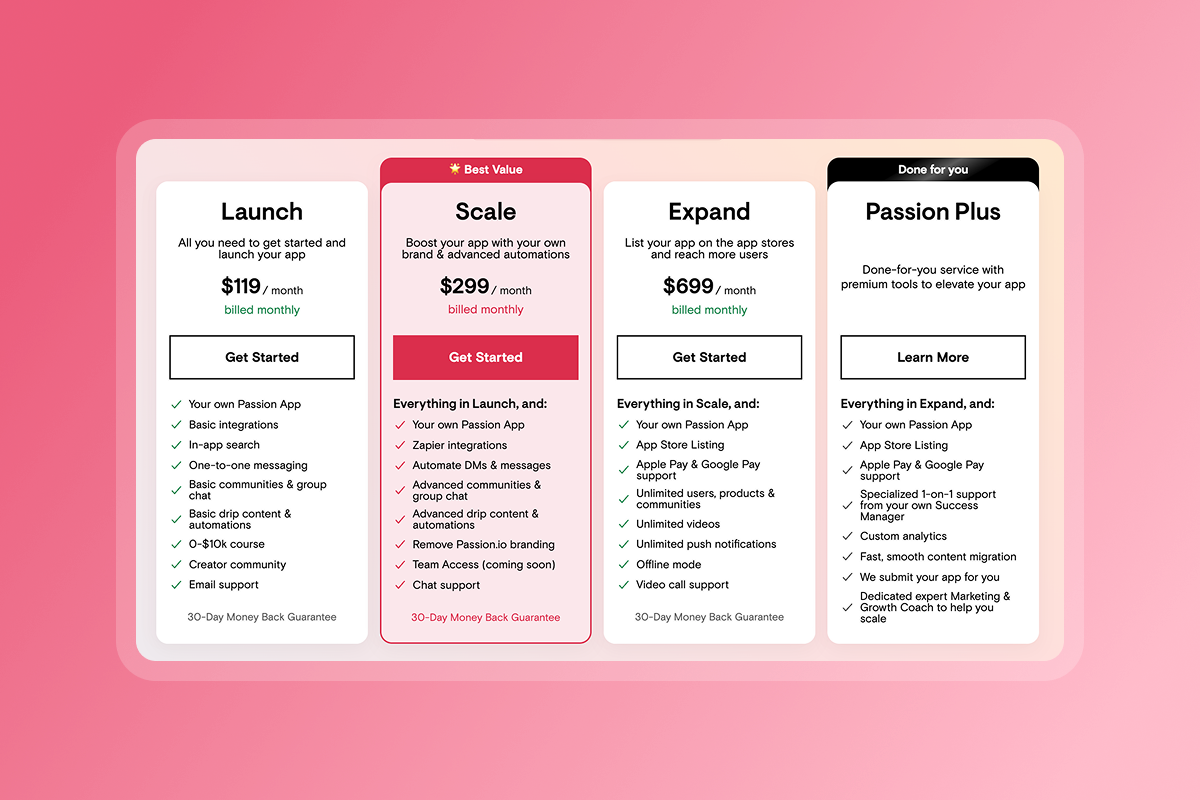
- Passion.io Launch plan: $99/month × 12 = $1,188
- Apple Developer Program: $99/year
- Google Play Developer: $25 one-time
- Fixed costs: $1,312
- Variable costs: 6.8% + $0.30 per web transaction OR 15-30% per IAP
Compare platforms and fees using Passion.io's complete fee breakdown to model your specific pricing tiers.
Step 5: Submit Your App to the App Store
App Store approval requires preparation but isn't technically difficult. Most delays come from incomplete metadata or guideline misunderstandings, not app quality issues.
The Submission Workflow
- Register developer accounts: Create your Apple Developer account ($99/year) and Google Play Developer account ($25 one-time).
- Prepare your metadata: Write your app description, create screenshots for multiple device sizes, design your app icon, and draft your privacy policy. Apple and Google both require clear privacy disclosures.
- Complete the pre-submission checklist: Review what to do before submitting your app to avoid common rejection reasons. Test thoroughly using TestFlight for iOS and internal testing for Android.
- Submit through Passion.io: Passion handles the technical submission process on Scale, Expand, and Plus plans. Launch plan members submit independently using Passion's guidance documentation.
Review Timelines and Common Rejections
Apple reviews 90% of submissions in under 24 hours, with most apps reviewed between 24-72 hours. Google Play uses automated reviews and typically completes reviews within a few days.
The three most common rejection reasons:
App Completeness (Guideline 2.1): Over 40% of rejections relate to incomplete apps, crashes, broken links, or placeholder content. Test on multiple device sizes and remove any "coming soon" messaging before submission.
Privacy Policy Issues (Guideline 5.1.1): Missing or unclear privacy policies cause frequent rejections. Host a complete privacy policy that covers all data your app collects and link it in both your app and App Store listing.
Incomplete Metadata: Blurry screenshots, vague descriptions, or broken support URLs trigger rejections. Provide clear, accurate descriptions and high-quality assets for all required fields.
If rejected, Apple provides specific feedback. Most issues are fixable within 1-3 days. Plan a 2-week buffer before your hard launch date. Read how to respond to App Store review guideline emails for detailed guidance.
"Supportive company, solid product, but app approval can be challenging... It took me many months and requiring me to get over a dozen people to test it daily for weeks during that period... Everything else about Passion I've appreciated." - Jesse Wiens Chu on Trustpilot
Step 6: Launch and Retain with Push Notifications
Launch day is important, but Day 90 matters more. Recurring revenue depends on retention, and retention depends on consistent engagement.
Week 1 - Welcome sequence: Send a push notification within 24 hours of signup, welcoming new members and pointing them to the first lesson. Studies show that retention rates are nearly 3x higher when users receive push notifications in their first 90 days.
Week 2-8 - Progress nudges: Schedule push notifications tied to lesson milestones. Push notifications have a 20% average open rate, creating consistent touchpoints that drive completion.
Ongoing - Community highlights: Feature member wins, upcoming live calls, and new content drops via push. Keep the app top-of-mind by giving members reasons to open it multiple times per week.
Run a Founding Member challenge where the first 50 members get special pricing and exclusive access. Use push notifications to guide them through daily actions over 7-14 days. Target a 15-30% completion rate increase within 90 days by combining push nudges with in-app community engagement.
Members can also access lessons offline by downloading content within the app, which removes barriers to completion.
How a Unified App Reduces Operational Drag
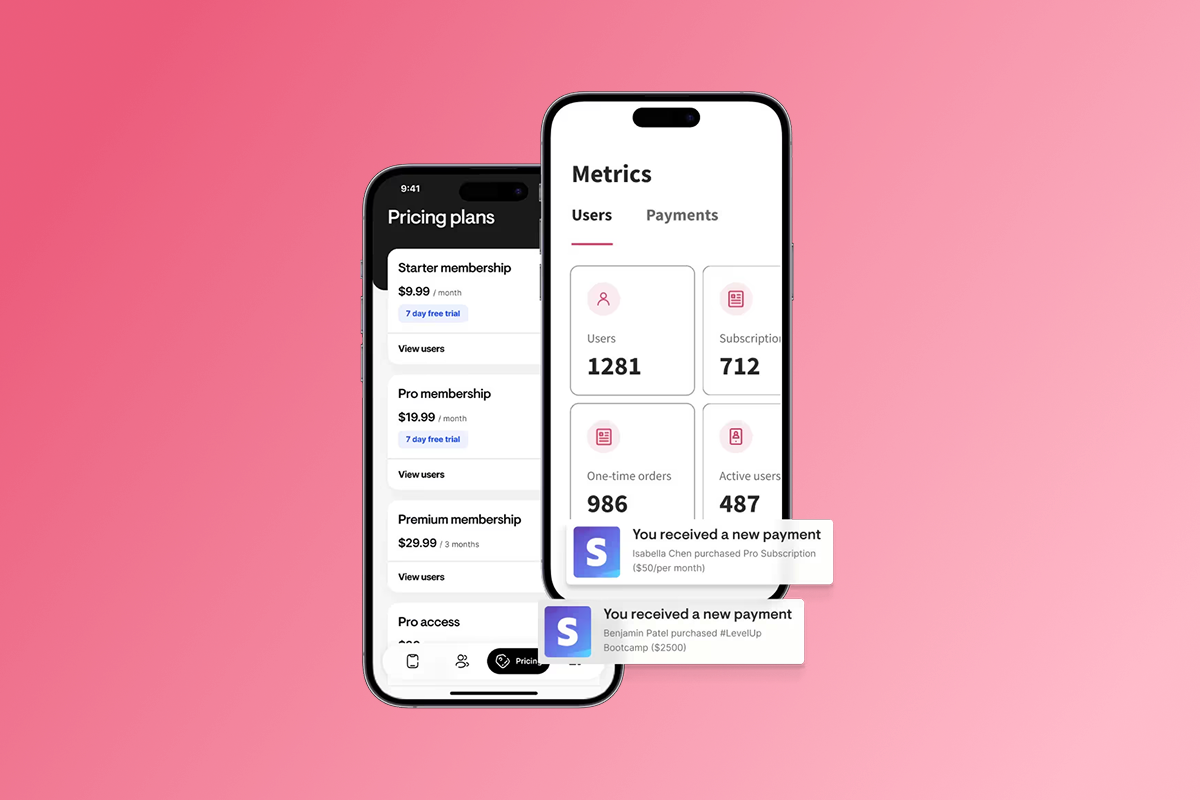
Tool sprawl creates operational chaos. You're logging into multiple platforms to check revenue, host calls, moderate community, send updates, and manage content. A unified creator membership app consolidates these workflows into one dashboard. Support tickets drop because members aren't asking "Where's the link?" or "Why can't I access this?"
The time savings compound. Instead of answering DMs across three platforms, you respond in one in-app chat. Instead of copying payment links into group posts, members purchase directly in the app. Instead of emailing lesson reminders, you send push notifications that reach phones instantly.
"Absolutely LOVE the Passion.io app platform. Everything you need to build and launch your app. They make it so easy and customer support is awesome!" - Shannon Reissman on Trustpilot
Review your current expenses across course platforms, community tools, payment processors, and email services. Compare total monthly spend to Passion.io's pricing plans to understand true cost savings.
Summary: The Path to Owned Recurring Revenue
Building a creator membership app shifts your business from rented platforms to owned infrastructure. You defined recurring offers with clear tiers, chose a no-code builder to launch in weeks, built your branded app without developers, set up payment paths that balance margin and convenience, submitted to app stores with realistic timelines, and implemented retention tactics through push and community.
The result is predictable monthly recurring revenue instead of launch-dependent spikes. You own the customer relationship, control the experience, and collect data that helps you improve over time.
Real creators achieve 15-30% completion increases and 10-20% MRR growth within 90-180 days using this model. Track conversion, retention, and ARPU from day one. Adjust your content, pricing, and engagement strategy based on what the data shows.
Budget $1,312 in fixed costs for your first year plus 6.8-30% in transaction fees. Plan ongoing content creation and community management. Accept that App Store reviews add 2-4 weeks to your launch timeline. The payoff is a sustainable business you control.
Ready to Build Your Creator Membership App?
Start your demo with Passion.io today. Launch your branded iOS, Android, and web app in 4-8 weeks and start building recurring revenue with a 30-day money back guarantee period.
Not ready to commit? Watch our free on-demand demo to see the builder in action and understand how the platform works.
Join thousands of creators who stopped renting attention and started owning their audience.
Frequently Asked Questions
How much does Apple charge for subscription commissions?
Apple charges 15% under the Small Business Program for creators earning under $1 million annually, or 30% for earnings above $1 million. Google charges 15% on all subscriptions.
Can I sell subscriptions on my website to avoid Apple fees?
Yes. Use PassionPayments for web checkout at 6.8% total fees, then grant app access after purchase. Passion.io charges 0% platform fee on external checkouts through ThriveCart or SamCart.
How long does App Store approval take?
Apple reviews 90% of apps in under 24 hours, with most taking 24-72 hours total. Google Play typically completes reviews within a few days. Plan a 2-week buffer for potential revision rounds.
What's the difference between web checkout and In-App Purchase?
Web checkout costs 6.8% + $0.30 via PassionPayments but requires members to purchase on your website first. IAP costs 15-30% but lets members buy inside the app with one tap.
How much does it cost to launch a creator membership app?
Budget $1,312 for first-year fixed costs: Passion.io Launch plan ($1,188), Apple Developer ($99), Google Play ($25). Add 6.8-30% transaction fees depending on payment method.
Key Terms Glossary
MRR (Monthly Recurring Revenue): The predictable income generated from active subscriptions each month, calculated by multiplying average subscription price by total active subscribers.
IAP (In-App Purchase): A transaction completed inside the iOS or Android app using Apple or Google's payment systems, which charge 15-30% commission.
Push Notification: A clickable message sent directly to a member's mobile device lock screen or notification center, shown to drive nearly 3x higher retention rates in the first 90 days.
Churn: The percentage of subscribers who cancel each month, calculated by dividing cancellations by total active subscribers at the start of the period.
PassionPayments: Passion.io's Stripe-powered web checkout system that charges 3.9% platform fee plus Stripe's standard ~2.9% + $0.30 processing fee.