.png)

Updated January 30, 2026
Online course creators with scattered tools face a consolidation problem. Hosting videos on one platform, running community in a Facebook group, and collecting payments through separate links creates friction that kills completion rates. A branded mobile app solves this by unifying courses, community, and payments in one place students open daily. Push notifications drive habit formation better than email, and subscription models stabilize revenue better than launch cycles. This guide walks you through building, launching, and monetizing your own app in 4 to 6 weeks without code.
Why Web-Only Course Platforms Are Leaking Revenue
The "headless LMS" problem destroys completion rates. You host videos on one platform, run your community in a Facebook group, schedule calls through Calendly, and collect payments via Stripe links. Each tool solves one job but creates three new ones. Students bookmark your course site, then never return. They see your Facebook post in their feed when the algorithm allows it, but miss your live Q&A because notifications drowned in the noise.
We see this in the data: 78% of online learners access LMS platforms from laptops while 45% use smartphones to complete courses faster, but your web-first LMS treats mobile as an afterthought. Students trying to finish a lesson on the train stare at a "Please use desktop for best experience" message. You pay for Zapier to connect the pieces and watch your Stripe dashboard show a launch spike followed by steady churn because students never formed a daily habit.
Many creators pay $400+ per month on software and still cannot send a single push notification to students. The mobile learning market hit $95.77 billion in 2026 and will reach $200.24 billion by 2031 because students want to learn on their phones, but web-only platforms lock you out of that behavior.
The Shift to Mobile-First: Why You Need a Branded App Now
Social platforms are rented land. You build an audience on Instagram, then an algorithm change cuts your reach by 60% overnight. A branded app is owned land. When you publish a new lesson or host a live call, you send a push notification that reaches students on their lock screens in seconds, compared to email that sits in crowded inboxes.
Push notifications create habit loops that email cannot match. You send a "Lesson 2 unlocked" nudge at 7 AM when students check their phones, and they complete the lesson during their commute because your app supports offline downloads. Three days later, you send a "Join tonight's live challenge check-in" reminder and 40% show up because the notification arrived when they could act. Studies show mobile learning increases knowledge retention by 55% compared to traditional methods because students engage in short, repeated sessions.
Beyond push, offline capabilities matter for fitness trainers whose students work out in gyms with spotty Wi-Fi, meditation coaches whose clients want to listen during walks, and business coaches whose audience travels. Students download lessons when they have a connection, then access them anytime. A fitness creator who moved her 30-day challenge into a branded app saw lesson completion jump 22% in 9 weeks and monthly churn drop from 8% to under 6% because push notifications and offline downloads kept students engaged.
How to Build Your Branded App Without Coding
Building your app starts with choosing a template. Health and fitness professionals use templates optimized for workout videos and progress tracking, while business coaches pick layouts for text-heavy lessons and community discussions. The drag-and-drop builder shows changes in real time, so you tweak colors and fonts until the app reflects your brand.
- Migrate and structure content. Export videos, PDFs, and slides from your current LMS. Create sequences and add lessons using the lesson management interface. Set drip schedules or release all content at once. Upload 10 to 15 core lessons in Week 1.
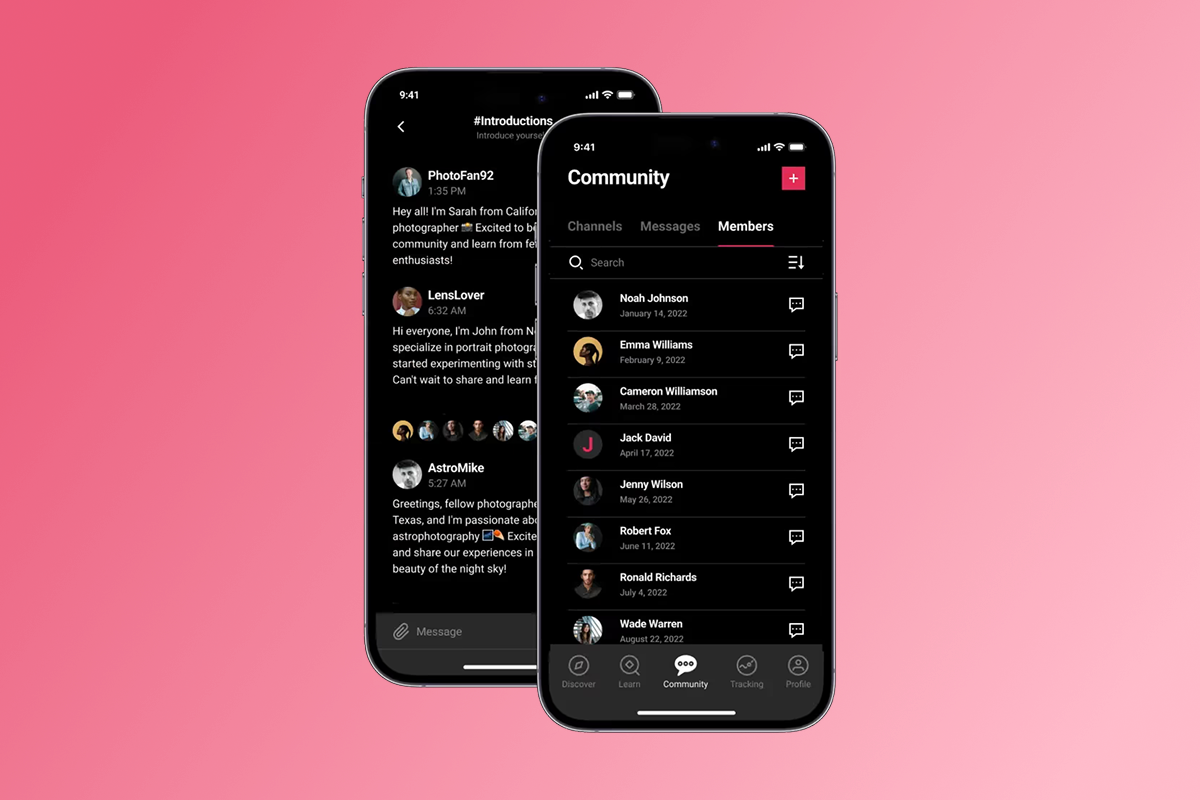
- Add community and interactivity. Turn on the in-app community feature to replace your Facebook group. Create channels for Q&A, wins, and accountability. Add polls and challenges using lesson widgets. Students post progress photos, answer daily prompts, and message each other without leaving the app.
- Branding customization. Upload your logo, set brand colors, choose fonts, and write your welcome message. Add your headshot, bio, and links to Instagram or YouTube. Customize the home screen layout so students see your featured course first.
- Set up payment flows. Configure subscriptions, one-time purchases, or freemium tiers in the payments dashboard. Connect Stripe for web checkout or enable in-app purchases. Set up a free trial to lower the barrier for new students.
Monetization Strategies: Web Checkout vs. In-App Purchases
Understanding the fee structure determines your margin. PassionPayments charges 3.9% on web transactions plus Stripe's standard 2.9% plus $0.30 per transaction, for a total of roughly 6.8% plus $0.30. Apple and Google charge 15% for developers earning under $1 million annually through their Small Business Programs, or 30% above that threshold.
For high-ticket offers like coaching packages, yearly memberships, and bundles, route customers to web checkout during onboarding emails or through a "Subscribe on Web" prompt inside the app. For low-friction, impulse buys like monthly subscriptions and challenge add-ons, use in-app purchases because convenience drives volume.
Recurring revenue models stabilize cash flow. Instead of launching every 90 days to hit revenue goals, you charge $29 per month or $297 per year and watch monthly recurring revenue compound. A wellness creator with 250 active subscribers at $22.22 per month generates over $66,000 in annual revenue, crediting in-app community and interactive live classes for retention. Spartan RAM offers monthly tiers from $97 to $297 and generates over $200,000 annually with approximately 180 subscribers.
Freemium and upsells work well in apps. Give away three free lessons or a 7-day mini-challenge to demonstrate value. Once students complete the free content, prompt them to upgrade to the full program or join your paid community. Use goal tracking features to show students their progress, then nudge them toward premium tiers when they hit milestones.
Engagement Features that Drive Completion
Gamification and progress tracking turn passive students into active finishers. Visual progress bars show students how far they have come and how much remains. Badges for completing modules or hitting streaks add a small dopamine hit. Check user progress from your dashboard to identify students who stall at Lesson 3 and send a personal nudge. Research shows personalization based on user behavior can increase push notification engagement rates by up to 400%.
Community challenges spike engagement fast. Run a 30-day challenge where students complete one lesson per day, post progress screenshots in the community, and receive a completion badge at the end. Send push notifications every three days with leaderboard updates and motivational messages. Push notifications paired with challenges can drive 15 to 30% completion rate lifts within 90 days because students form daily habits.
Push notification strategy requires discipline. Send 2 to 3 notifications per week when students are most active. Schedule these types:
- Onboarding: Welcome messages when users first join.
- Engagement: Lesson unlock and progress milestone reminders.
- Community: Alerts when members post questions or share wins.
- Re-engagement: Nudges for students who have not logged in for 7+ days.
Sending a push when a user is most likely to be active increases engagement uplift by 75% and purchase uplift by 384%. Build a simple push calendar: Day 1 welcome and first lesson unlock, Day 3 completion reminder, Day 7 live Q&A invite, Day 14 halfway progress nudge, Day 21 community share prompt, Day 30 upgrade offer.
Launching Your App: The Submission Process Explained
The timeline from signup to live app runs 4 to 6 weeks:
- Week 1: Sign up for a plan, complete initial training, gather content, and open Apple and Google developer accounts.
- Week 2: Build the app, upload core content, and configure pricing.
- Week 3: Publish the web app, begin marketing, and submit iOS and Android apps for review.
According to Apple's official App Review documentation, 90% of submissions are reviewed in less than 24 hours, but plan a buffer for requested changes.
You must open developer accounts. Apple requires enrollment in the Apple Developer Program at $99 per year. Google charges a one-time $25 registration fee. You register these accounts under your own name or business entity, so you own the relationship with the app stores.
Submission support varies by plan. Expand and Plus plans include hands-on App Store submission support, while Launch and Scale provide guides and documentation for self-submission. The platform handles cloud hosting, automatic updates, and web publishing. Before submitting, complete the pre-submission checklist covering app icons, screenshots, descriptions, and privacy policies.
"Easy, Friendly staff and lots of support... The customer support staff are very helpful and respond very fast, they helped me navigate the Apple/Google sites to get the app live which no hesitation." - Natalie Gidas on Trustpilot
Real-World Examples: Creators Winning with Apps
Fitness and wellness creators see the biggest retention gains. A fitness coach moved a 30-day challenge from Facebook and Zoom into a branded app with push notifications twice weekly. Lesson completion jumped 22% in 9 weeks and monthly churn dropped from 8% to under 6%. The coach credited push notifications and offline downloads for keeping students engaged during workouts. Fitness creator Adam Frater scaled his app to over $50,000 per month within the first few months of his relaunch.
Skills and arts instructors consolidate community and content. CirquePlus offers aerial arts training through a branded app, combining video lessons with a community where students share progress and ask technique questions. Tiffany Wilkerson's Results Earned app offers six-week challenges priced at $400+, generating approximately $4,650 per month with over 50 subscribers.
"I can't think of a better company that will deliver on the tech side of things but also really care about the impact you're going to make as a creator or coach... Every single person I've met is very passionate about the mission which is to make this world a better place by empowering creators..." - Andrew Truong on Trustpilot
The common thread across these case studies is ownership. Creators control the customer list, the pricing, the content, and the relationship. They stopped depending on Facebook's algorithm or Instagram's reach.
"I am thrilled with everything so far. Incredible support, constant innovation, a step by step guide so you can follow the process, and the best FB community I have ever belonged to... They take the guess work out of everything..." - Lori on Trustpilot
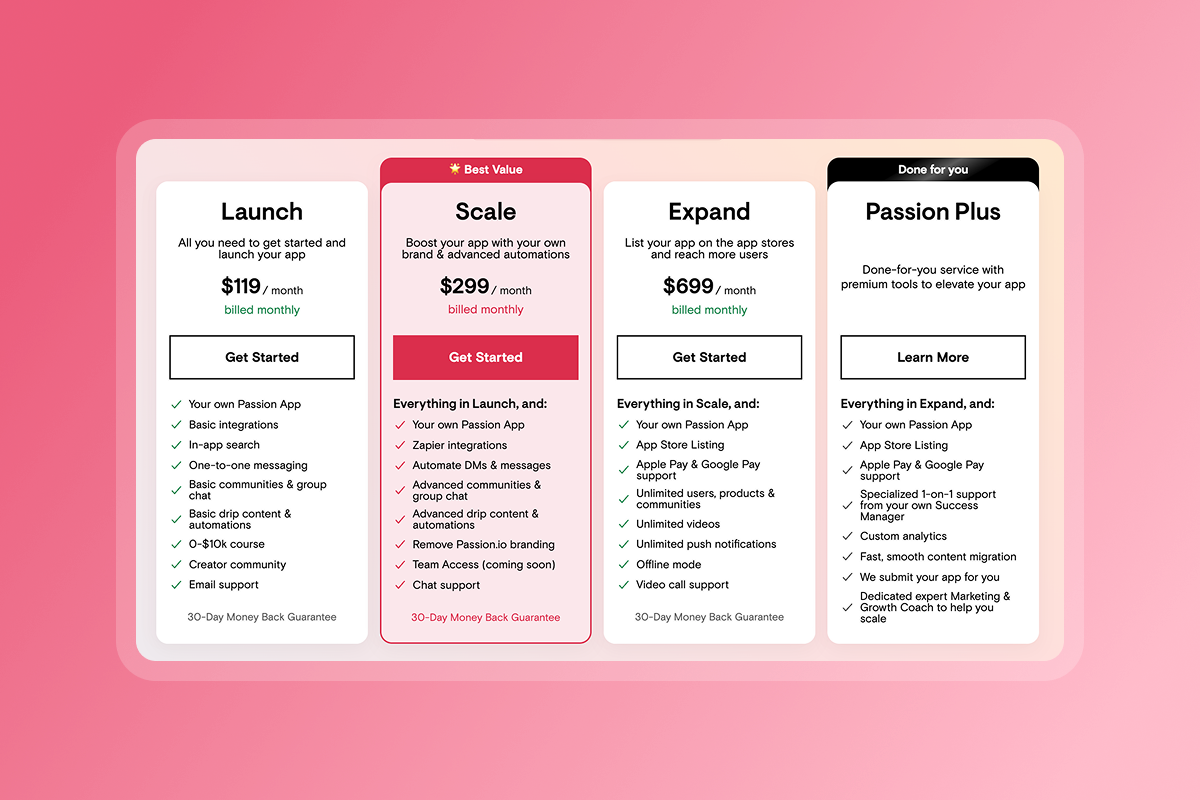
Book a demo at passion.io/platform-demo to see the drag-and-drop builder and payment flows in action. Plans start at $99 per month billed annually on the Launch tier, with a 30-day money-back guarantee so you can build, test, and migrate content without long-term risk. For a full platform walkthrough, watch the Welcome To Your Passion App video.
Frequently Asked Questions About Course Creator Apps
Do I need a developer to update the app?
No. You make changes through the dashboard and they publish instantly to web, iOS, and Android.
Can I sell on my website and the app?
Yes. Use web checkout for high-ticket offers and in-app purchases for mobile convenience.
Who owns the data?
You do. You own the Apple and Google developer accounts, the customer list, and all content.
What happens if I cancel?
You can export your customer list and content. The app stops working, but you retain ownership of your accounts.
How do I track engagement?
Use the built-in analytics dashboard to track audience movements and lesson completion rates.
Key Terms Glossary
Native App: A mobile application built specifically for iOS or Android, with full access to device features like push notifications, offline storage, and camera.
Progressive Web App (PWA): A web-based app that runs in a browser and can work offline but lacks full native device integration.
Push Notifications: Messages sent directly to a user's lock screen or notification tray, even when the app is closed.
In-App Purchase (IAP): Transactions processed through Apple or Google's payment systems, subject to 15 to 30% platform fees.
Churn: The percentage of subscribers who cancel each month. If you start with 100 subscribers and 5 cancel, your monthly churn rate is 5%