


No Code App Builder for Creators: Launch Without Devs
Updated January 29th, 2026
If you're juggling Instagram DMs, a Facebook group, Zoom links, Stripe checkouts, and a separate course platform, you already know the cost of tool sprawl. Members can't find their login, your reminders compete with crowded inboxes, and every launch spikes revenue before churn erodes it. Custom app development quotes start at $30,000 and stretch into six-month timelines, making it a non-starter when you need to consolidate fast and own your audience now.
No-code app builders have changed that equation. You can build a real mobile app with courses, community, and payments in weeks without touching a line of code. This guide shows you exactly what you can build, what it costs, and how to launch in 90 days.
Why Creators Are Ditching Custom Development for No-Code Tools
Custom development agencies quote $80,000 to $250,000 for a mobile app with real workflows, and most funded teams building in the US or EU end up in that range for a v1 with meaningful features. The average timeline spans 4-7 months from kickoff to launch, and once you ship, ongoing maintenance adds another 15-25% of the original cost annually. If you spent $100,000 upfront, you're looking at $15,000-$25,000 per year just to keep the app running, fix bugs, and update for new iOS and Android versions.
No-code platforms flip the model entirely. Passion.io's Launch plan costs $99 per month on annual billing, plus $99 per year for the Apple Developer Program and a $25 one-time fee for Google Play, bringing your first-year total to $1,312. Your web app can go live within 2-3 weeks of starting, and most creators publish fully functional iOS, Android, and web apps within 4-8 weeks of signing up.
We handle updates, security patches, and new feature rollouts inside your subscription, so when Apple releases iOS 20 or Google changes an API, you don't get a surprise invoice or coordinate with developers to fix compatibility issues. Server maintenance, hosting, and the technical "plumbing" run in the background while you focus on building the features your audience actually uses.
"After building my online training programme, I have always wanted to create an app to make it more accessible for my clients, but could never afford it, this approach makes it affordable, easy, fun and really quick to do!" - Jane Mullins on Trustpilot
Comparison: Custom Development vs. No-Code Builder
What features can I build without writing code?
You can build a complete learning and community platform without hiring a developer using the same tools successful creators already use. The drag-and-drop interface requires zero coding, with templates for fitness coaches, wellness programs, and business courses speeding up setup. Here's what you can create inside the builder.
Interactive Courses and Drip Content
Upload videos, audio files, PDFs, and text into lessons that students access inside your branded app, and the course builder supports interactive quizzes, timers, goal tracking, and progress bars without requiring custom code. Set drip schedules to release content weekly or monthly, or unlock lessons based on completion so students move through your curriculum at the pace you design. Students can download content for offline access on the Expand plan, meaning they watch or listen without wifi during commutes or travel.
The builder includes templates across industries, so you pick one that fits your niche, drag in your content, and customize branding with your logo, colors, and fonts. You don't write HTML or CSS because you select from preset layouts and adjust settings with toggles and dropdowns. For step-by-step guidance on setting up your first lessons, check the help article on building your first app. That ease of use is what creators notice first.
Native Push Notifications and Community
Push notifications consistently outperform email for mobile engagement because they land directly on the home screen rather than competing with spam folders, promotional tabs, and crowded inboxes. Push notifications achieve open rates of 20-90% depending on timing and personalization, and get instant reactions whereas emails usually see a delay of 6.5 hours. That gap explains why push-driven apps consistently outperform email-only platforms on completion and retention.
Inside Passion.io, you schedule push notifications for course reminders, challenge check-ins, and new content announcements, and the push notification feature supports segmentation by access level so you send different messages to free members versus paid subscribers. Those direct nudges build the habit loop that raises completion, and the same principle applies to your community space.
The in-app community replaces Facebook groups with channels, posts, likes, and comments that live inside your branded app, meaning you control the feed, you own the data, and members don't leave your app to engage. Native apps are installed through an app store and appear on the user's home screen with a recognizable icon, enabling direct push notification delivery that web-only platforms can't match. For more on managing community interactions, see the PassionFighters In-App Community Guide.
"I recommend using passion.io of you want to build an easy online business to put you community together without lots of noises around you like some other noisy platforms out there." - Kira Lancian on Trustpilot
Flexible Monetization and Subscriptions
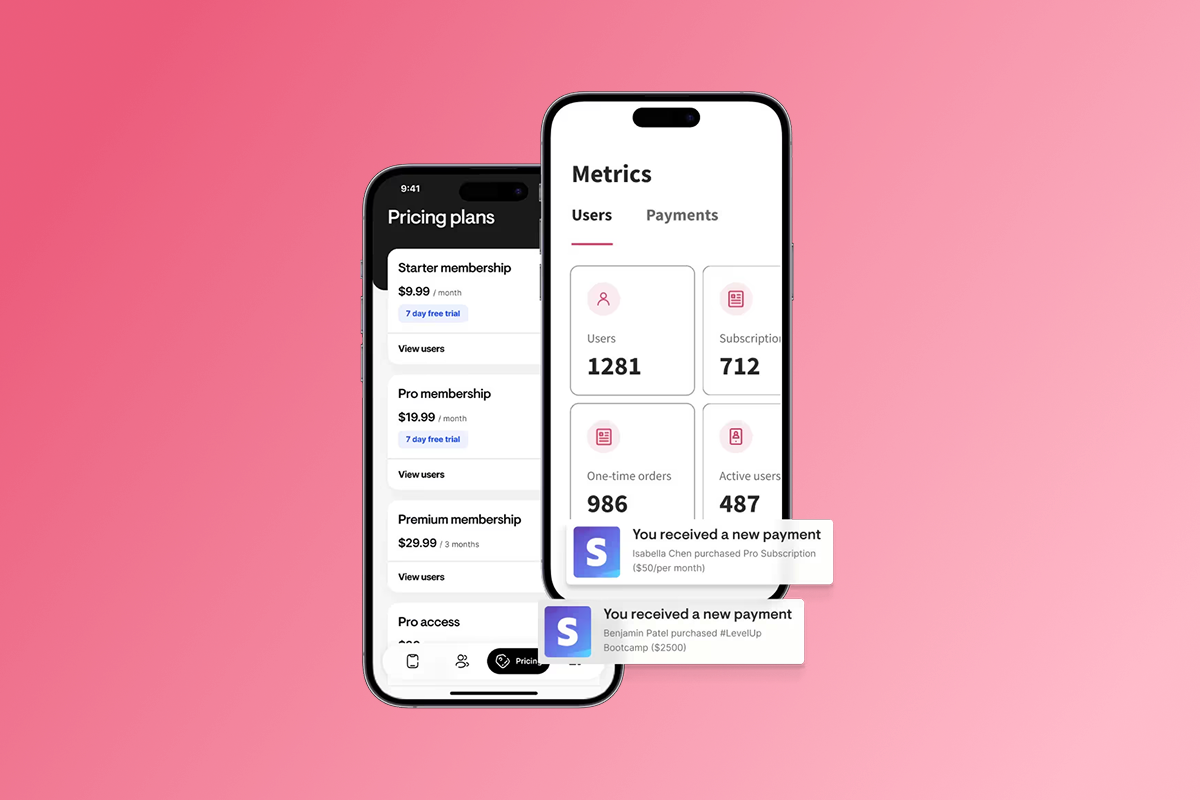
Set up monthly, annual, or weekly subscriptions directly in the builder, add one-time purchases for challenges or bundles, and offer freemium access with premium tiers without writing payment integration code. The monetization setup supports multiple payment pathways including PassionPayments for web checkout, in-app purchases for Apple and Google, or external checkouts through your own Stripe account.
PassionPayments web checkout: 3.9% platform fee plus Stripe's standard 2.9% + $0.30 for domestic card transactions brings the total to approximately 6.8% + $0.30 per transaction.
In-app purchases (IAP): Apple takes 15-30% depending on your revenue and subscription duration, while Google charges 15% on the first $1 million per year and 30% above that threshold.
Use web checkout when margin matters on high-ticket offers, and route to IAP when mobile convenience drives higher conversion on smaller purchases. You control the pricing structure and can test both pathways to see which performs better with your audience. For bulk user management when you're adding existing students, see the help doc on adding users in bulk.
How to Choose the Right No-Code App Builder
Not all no-code builders deliver the same end-user experience, and the differences matter for engagement and retention. Some platforms wrap a mobile website in an app shell, while others build true native apps with offline access and push notifications. Here's how to evaluate your options based on what drives recurring revenue.
1. Native App vs. Web Wrapper
A native app is installed through an app store and appears on the user's home screen with an icon, enabling direct push notification delivery, while a web wrapper is just a browser view packaged as an app with no enhancements. Native apps generally deliver superior performance due to direct hardware access and platform optimization, and app stores act as a massive shopping window that web-only platforms can't access because users discover and install apps through those storefronts.
Passion.io builds native iOS and Android apps plus a web app, so your audience can access content on any device with the full native experience including offline downloads and persistent home screen presence. The native app experience creates habit-forming behavior because your icon sits next to Instagram and TikTok rather than buried in browser bookmarks.
2. Monetization Control
Look for platforms that offer multiple payment pathways so you can optimize for margin or conversion depending on the offer. PassionPayments charges 3.9% on web transactions, which saves margin compared to Apple or Google's 15-30% cut, but mobile users often convert better when they can pay with Face ID or one-tap checkout inside the app. Choose a builder that supports both pathways and lets you decide which fits your pricing model for each product.
3. Training and Support
Software alone doesn't build a business, so look for platforms that teach you how to structure offers, launch, and sell rather than just handing you a builder and wishing you luck. Passion.io includes training like the Expert Unleashed Challenge and Passion Academy, which creators credit for sales outcomes in reviews, and the Passion.io mobile app lets you manage content and respond to members from your phone while you're on the go. That combination of technical tools and business guidance is what separates builders that creators actually succeed with from those that sit unused after the first month.
"Passion.io has given us the opportunity to create an app which would not have been possible without their daily guidance and support. We recommend passion.io for anyone looking to take their new or existing biz online." - Natasa and Angelina on Trustpilot
For a broader comparison of no-code builders across different creator niches, read the guide to top no-code app builders for coaches. To see all available features in Passion.io including integrations and automation options, check the complete features guide.
The 90-day Success Plan: From Idea to Recurring Revenue
Launch timelines matter when you're burning $200-500 per month on scattered tools and losing members to access friction, so here's a realistic 90-day roadmap based on typical creator launches that takes you from idea to paying subscribers.
Days 1-30: Build and Prepare
- Set up developer accounts: Register Apple Developer Program ($99/year) and Google Play Console ($25 one-time) early in the process because account verification can take time.
- Prepare core content: Upload 5-10 lessons as your minimum viable product including videos, PDFs, and any audio files that demonstrate the value of your full program.
- Customize branding: Add your logo, choose colors, and set fonts using the template library so your app feels like an extension of your existing brand rather than a generic learning platform.
- Set pricing: Choose monthly, annual, or bundle pricing and decide whether to use web checkout or in-app purchases for your first offer based on your target price point and margin requirements.
- Finalize metadata: Write your app name, description, and keywords, prepare screenshots and an icon that match App Store guidelines, and draft your privacy policy before submission deadlines hit.
Milestone: Your web app can go live within 2-3 weeks of starting, meaning you have a working URL you can share and charge for while iOS and Android submissions proceed in parallel.
Days 31-60: Launch and engage
- Submit to app stores: App Store submissions typically occur by week 3-4, and on average, 90% of submissions are reviewed in less than 24 hours by Apple, though exact timing varies because human reviewers assess each app.
- Run a beta launch: Invite 20-50 existing audience members to test the app and provide feedback on navigation, content clarity, and any friction points before your public launch.
- Send welcome push notifications: Schedule 2 push notifications per week to drive logins and content consumption without overwhelming new members with too many messages.
- Activate community: Post daily in your community feed for the first two weeks to demonstrate engagement value and show members that the space is active rather than a ghost town.
Milestone: Most creators have fully published iOS, Android, and web apps within 4-8 weeks of signup. By the end of week 8, target 20-50 active users and engagement data that tells you what content to build next.
Days 61-90: Scale and measure
- Expand content library: Add 5-10 more lessons based on member questions and feedback patterns you've seen in community posts and support messages.
- Introduce upsells: Launch a premium tier or one-time challenge offer that serves members who want deeper access or faster results than your base membership provides.
- Optimize engagement: Track completion rates and adjust drip schedules based on when drop-offs occur, because push notifications achieve 20-90% open rates but only if you send them at times when members can act.
- Review analytics: Use the tracking code feature to monitor user behavior and identify drop-off points where lesson completion stalls or members churn.
Milestone: At typical membership pricing, most creators reach break-even with just 5-10 paid subscribers on the Launch plan. On the Scale plan at $239/month, you need 5 paying subscribers at $49/month to cover the platform cost, and subscriber number 6 generates $45.37 net profit above the platform fee.
For automation ideas to save time during scaling such as automatic user provisioning and content unlocks, explore the Zapier integration options. You can also set up limited-time product availability to create urgency without manual work.
Total cost of ownership: Platform fees vs. custom dev
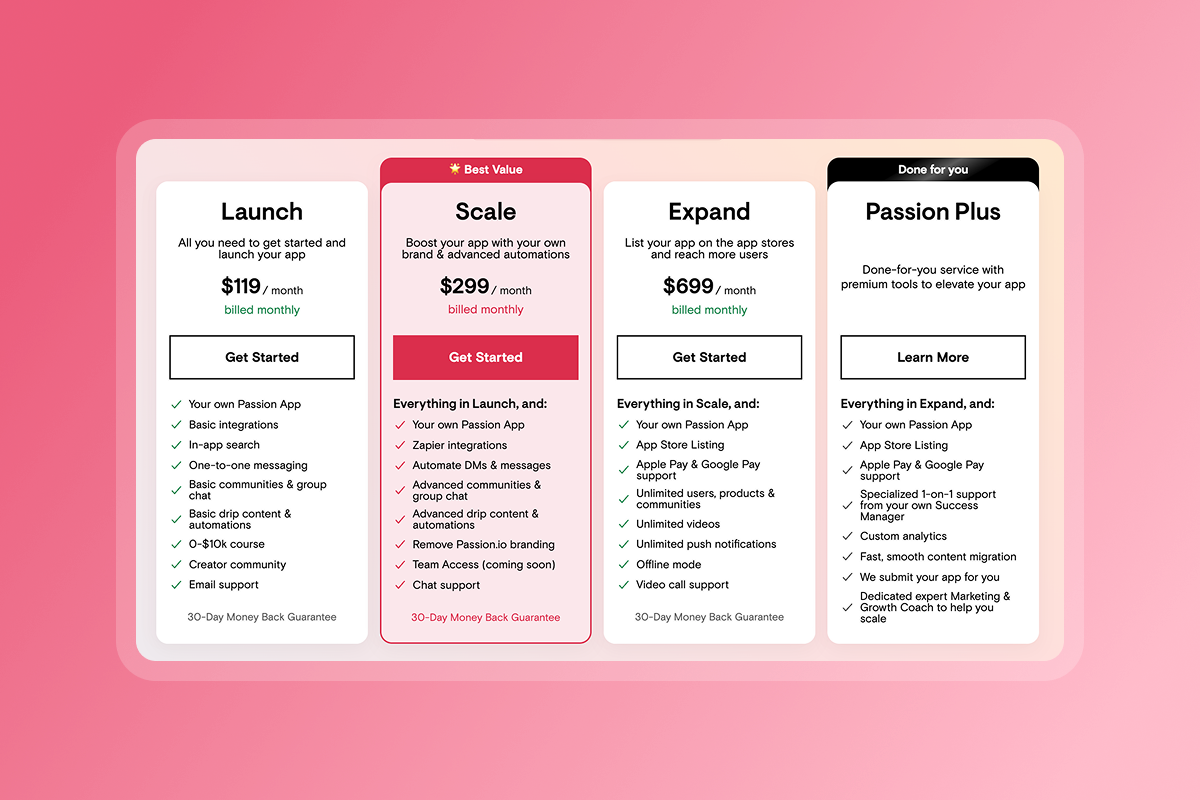
Hidden fees destroy trust and blow up budgets, so here's every cost upfront including platform subscription, store fees, and transaction fees for both web and in-app purchases.
Platform subscription (annual billing)
- Launch Plan: $99/month = $1,188/year
- Scale Plan: $239/month = $2,868/year
- Expand Plan: $599/month = $7,188/year
App store developer fees
- Apple Developer Program: $99/year recurring
- Google Play Console: $25 one-time fee
Transaction fees
- Web checkout (PassionPayments): 3.9% platform fee plus Stripe's standard 2.9% + $0.30 for domestic card transactions brings the total to approximately 6.8% + $0.30 per transaction.
- In-app purchases (Apple/Google): 15-30% depending on your revenue and program eligibility, with Apple offering 15% for developers earning under $1 million annually through their Small Business Program.
First-year TCO example (Launch Plan)
- Platform: $1,188
- Apple Developer: $99
- Google Play: $25
- Total fixed costs: $1,312
Compare that to custom development: $80,000-$250,000 upfront plus 15-25% annually for maintenance, meaning a $100,000 app costs $15,000-$25,000 per year just to keep running when iOS or Android updates roll out. Use web checkout when you want to preserve margin on high-ticket offers, and route mobile users to in-app purchases when convenience matters more than fees. For detailed pricing guidance including break-even calculations at different price points, read the full pricing guide for creator app costs.
"I have played around with several app building platforms and Passion is the best to me... You can just tell that they are committed to serving their customers." - Quiana LaChe Ross
Frequently asked questions about creator app builders
Do I own my content and user data?
Yes. You own your branded app with your name in the Apple App Store and Google Play Store, and you control the content, the community, and the member list without platform dependency. Unlike social platforms or marketplace models where you build on rented land, your app and audience data belong to you.
How long does Apple approval take?
On average, 90% of submissions are reviewed in less than 24 hours according to Apple's developer resources. However, the exact time can vary because human reviewers assess each app, so plan for potential clarification rounds. See what to do before submitting your app to avoid common rejection reasons.
Can I migrate my existing students from another platform?
Yes. You can add users in bulk via CSV import or send invite links through the messaging feature to transition existing members without manual one-by-one entry.
What happens if I want to cancel?
After that, you can cancel your subscription and export your content and member list to preserve your data.
How do I get my app discovered in the app stores?
Use App Store Optimization (ASO) to identify keywords and optimize your app listing for search visibility. Start with these 5 free ASO tools to research which terms your target audience searches for.
Key terms glossary
Native App: An application installed directly on a device through an app store, supporting features like push notifications, offline access, and hardware integration. Native apps appear on the user's home screen with a recognizable icon that builds habit-forming behavior.
No-Code: Development using visual drag-and-drop interfaces instead of programming languages. The builder requires zero coding, making app creation accessible to non-technical creators without developer hiring costs.
Push Notification: A direct message sent to a user's device home screen that appears outside the app. Push notifications achieve 20-90% open rates depending on timing and personalization, outperforming typical email engagement.
In-App Purchase (IAP): A transaction completed through the Apple or Google payment system inside a mobile app. Apple and Google retain 15-30% of each purchase as their platform fee.
Drip Content: Content released on a schedule (weekly, monthly, or based on completion) rather than all at once. This feature helps increase engagement and completion rates by preventing overwhelm and creating anticipation.
Web Wrapper: A mobile website packaged as an app with no native enhancements. Unlike true native apps, web wrappers don't support reliable push notifications, offline access, or the performance benefits of native code.
You have the content. The audience is ready. The tech barrier that kept you from owning your platform just disappeared.
Custom development costs six figures and takes months while no-code builders let you launch in weeks for a fraction of that investment. You consolidate your tools, own your audience data, and send push notifications that land on every subscriber's home screen rather than buried in email folders competing with spam. Your app becomes the hub where members access lessons, engage with community, and renew subscriptions without leaving to find login links or navigate fragmented platforms.
Start building your branded app today. See the builder in action with a welcome video walkthrough, or check the latest platform updates to see how the features continue to evolve based on creator feedback.

Build the business
behind what you know.
Turn your expertise into a branded app with courses, community, and the You AI Coach. Launch plan from $99/month.