


What's the Best App Builder for Content Creators in 2026?
 By Julieta Gil
.png)
TL;DR: If you run a coaching business with content ready to monetize, choose a platform that delivers native mobile apps with push notifications, not mobile-responsive websites. Passion.io gives you branded iOS and Android apps in 4-6 weeks for $99-$599/month (annual), with 3.9% web checkout fees and training included. Kajabi and Mighty Networks offer strong web tools but charge premium prices for true native apps. Custom development costs $80,000-$250,000 and takes months. Your decision hinges on launch speed, push notification capability for retention, and total cost including Apple's $99/year and Google's $25 one-time fees.
Creators today face a hard truth. Social algorithms can cut your reach overnight. Stitching together a course platform, payment processor, Zoom account, and Facebook Group creates operational chaos that kills engagement. Your students buy but don't finish, and you have no way to nudge them back to the content.
This guide ranks the top five app builders for creators in 2026 based on launch speed, mobile-first engagement features, monetization flexibility, and total cost of ownership. I've mapped each platform to real use cases in fitness, wellness, arts, and coaching so you can choose the path that fits your niche, timeline, and budget.
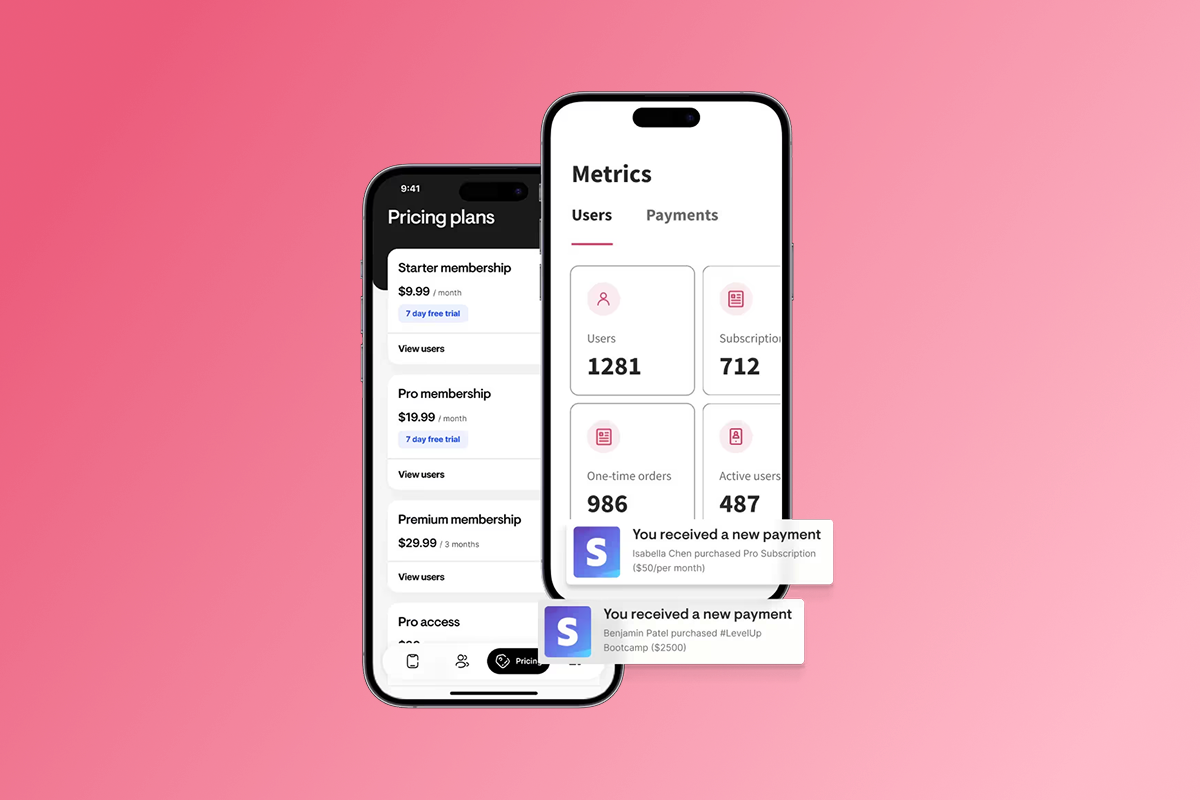
Why Creators Are Moving from "Rented Land" to Owned Apps
Social platforms are rented land. Algorithm changes can throttle your reach without warning, and you never own the customer relationship or data. One shift in TikTok's feed logic or Instagram's visibility rules can erase months of audience building.
As a result, creators who consolidate their content, community, and payments into a branded mobile app report higher completion rates and more predictable recurring revenue. Push notifications deliver 20% average open rates compared to email's 18-25% industry average, but the real advantage is visibility. Push notifications achieve 28% click-through rates versus email's 1-2%. That difference compounds over time. When you can nudge members back into a lesson or challenge with a single tap, retention improves and churn drops.
The shift to owned apps also solves tool sprawl. Managing Stripe links, Zoom rooms, Facebook Groups, and a separate LMS burns time and creates support tickets. In practice, a unified app cuts the number of logins, reduces access confusion, and gives you one dashboard for content, community, and revenue.
Consider the case of Cirque+ founder Allie Cooper, who teaches aerial arts. Within one week of launching her branded app, she made over $4,000. With more than 50 subscribers, her app now generates over $50,000 in revenue. She uses drip content to pre-sell new lessons and quizzes to tailor client experiences.
| Model | Reach Control | Data Ownership | Engagement Tools | Revenue Stability |
|---|---|---|---|---|
| Social platforms | Algorithm-dependent | Platform owns | Limited | Unpredictable |
| Branded mobile app | Direct push access | You own | Push, community, offline | Recurring subscriptions |
For creators evaluating how to build a branded app, the core question is whether you want to keep renting reach or own the relationship.
The 5 Critical Criteria for Choosing a Creator App Builder
When you compare app builders, ignore the marketing hype and focus on five measurable factors that determine whether your app will launch on time, engage users, and generate recurring revenue.
1. Native mobile app vs. mobile-responsive web
A native mobile app is built specifically for iOS and Android using platform-specific code, distributed through the Apple App Store and Google Play Store. Native apps have full access to device features like push notifications, offline mode, and camera integration. Progressive Web Apps (PWAs) are websites that look like apps but run in a browser and lack the same level of device access.
The difference matters for creators. Native apps provide deeper integration and better performance than PWAs. If your monetization model depends on daily or weekly engagement, you need real push notifications, not browser-based alerts that users can easily miss.
2. Speed to launch
Every week you delay launching costs you potential subscriptions. Apple's app review process averages 24-48 hours, and Google Play reviews take 24-72 hours for standard apps. Therefore, plan a 2-3 week buffer for initial approval and troubleshooting. No-code platforms can have your web app live in under two weeks and your mobile apps submitted shortly after.
3. Monetization flexibility
You need multiple ways to charge: subscriptions (weekly, monthly, annual), one-time purchases, bundles, and freemium tiers. More importantly, you need to understand the fee structures. Web checkout fees are typically lower but require users to complete purchase flows outside the app. Apple charges 15-30% on in-app purchases, and Google charges 15-30% depending on your revenue threshold. If your margins are tight, routing high-ticket bundles through web checkout can save thousands per year.
4. Community integration
Facebook Groups are free but live on rented land. An in-app community gives you control and keeps engagement inside your branded experience. Look for platforms that offer threaded discussions, direct messaging, and the ability to run challenges or cohorts.
"They make it so easy and customer support is awesome!" - Shannon Reissman on Trustpilot
5. Data ownership and export
If you ever need to migrate, you want a clean export of your user data, content, and transaction history. Some platforms lock you in with proprietary formats or limit exports, creating switching costs that hurt you long-term. Passion.io allows bulk data export to CSV files. Always confirm export capabilities with any platform before you commit.
For a detailed walkthrough of how these features work in practice, watch the Welcome To Your Passion App video from the Passion.io team.
Top 5 App Builders for Creators Ranked (2026 Edition)
I've evaluated the leading platforms based on launch speed, mobile-first features, pricing transparency, and real-world case studies from creators in fitness, wellness, arts, and business coaching. Each section includes a clear "Best For" recommendation so you can quickly identify which tool fits your niche and timeline.
1. Passion.io: Best for Coaches and Community-First Creators
Passion.io is a no-code platform that delivers native iOS and Android apps plus a web app under your brand. You get drag-and-drop course building, in-app community channels, push notifications, challenges, and flexible monetization through subscriptions or one-time purchases.
Key features:
- Native mobile apps published to Apple App Store and Google Play
- Push notifications with scheduling and automation
- In-app community with threaded discussions and direct messaging
- Interactive courses with drip content, quizzes, and offline downloads
- PassionPayments web checkout (3.9% platform fee) or in-app purchases (Apple/Google take 15-30%, Passion.io charges 0%)
- Training programs including the 30-day Expert Unleashed Challenge to help you launch and acquire your first 5-15 customers
Pricing (2026):
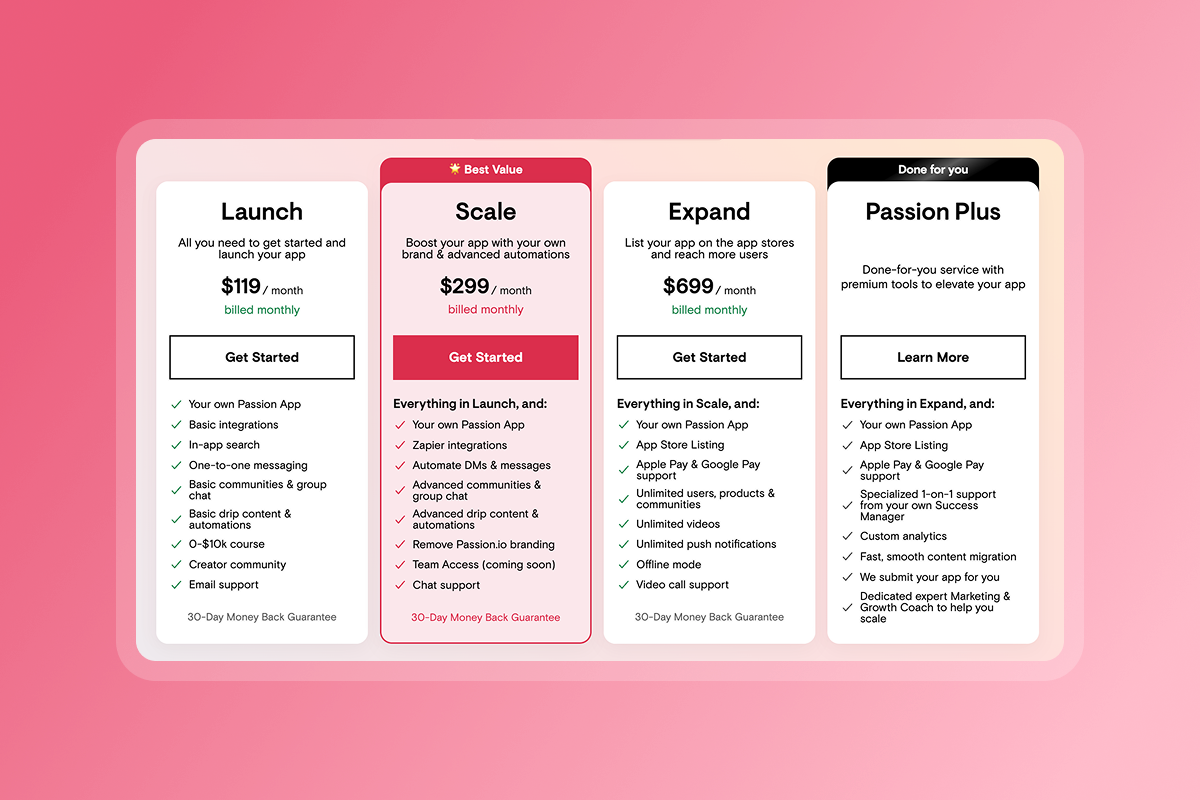
- Launch: $99/month (annual) or $119/month (monthly)
- Scale: $239/month (annual) or $299/month (monthly)
- Expand: $599/month (annual) or $699/month (monthly)
- Plus: Custom pricing for done-for-you service
Real-world proof:
Jay Fenichel of The Drummers Almanac teaches 4,000+ students professional drumming skills. When he launched his first course on Passion.io, he had over 100 applicants. He stopped wasting time and money on expensive website developers and now uses the community feature to create an ecosystem inside his business.
"I am so excited to be a part of the Passion.io community. Dan is a really authentic and genuine human being who through his organisation has given me the opportunity to create my own app for dementia caregivers in easy to learn steps while being supported at every turn." - Jane Mullins on Trustpilot
Who should choose Passion.io:
- Fitness trainers, wellness coaches, and skills educators who need mobile-first engagement
- Creators with content ready who want to launch in 4-6 weeks
- Coaches who value training and playbooks as much as the platform itself
- Anyone tired of tool sprawl who wants courses, community, and payments unified
For a full walkthrough of the platform's capabilities, explore the Passion.io platform demo or see how health and fitness professionals are scaling with the tool.
2. Kajabi: Best for Web-First Course Marketing
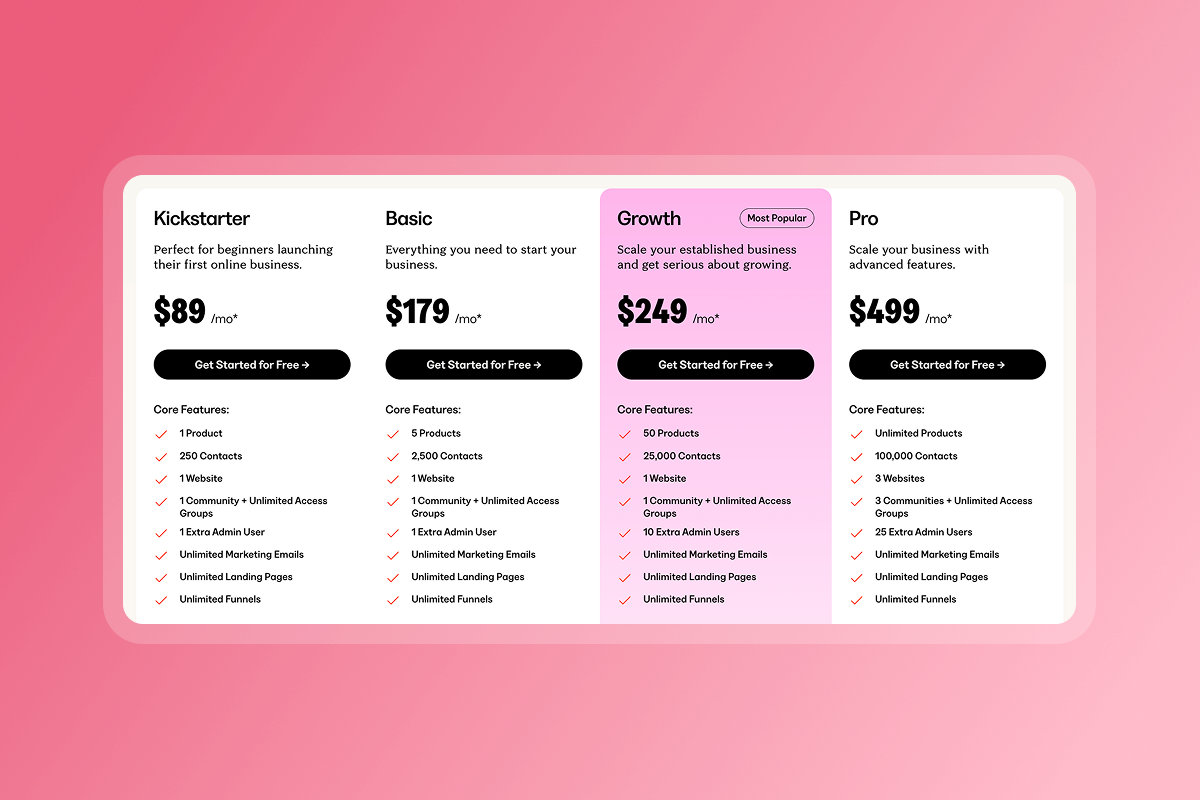
Kajabi is a comprehensive web-first platform built for creators who prioritize email marketing funnels, landing pages, and automated campaigns. It includes course hosting, membership sites, and a website builder. However, Kajabi's mobile app options typically come at premium pricing tiers beyond the entry-level Kickstarter plan ($89/month).
Considerations:
- Strong email marketing and funnel-building tools
- Website and landing page builder included
- Mobile apps often require higher-tier plans or shared containers
- Less emphasis on native push and in-app community
Kajabi excels if your primary strategy is driving traffic through webinars, email sequences, and paid ads to web-based sales pages. If you need robust CRM and email automation tied to course delivery, Kajabi's ecosystem is mature and well-supported.
Who should choose Kajabi: Creators who run launch campaigns and webinars as their primary acquisition model, need advanced email automation, and are comfortable with web-based member experiences over mobile app engagement.
3. Mighty Networks: Best for Large-Scale Social Communities
Mighty Networks focuses on social-style communities with feeds, events, and member profiles. It offers course functionality, but the platform's strength is community engagement at scale. Mighty Pro provides branded native apps, but pricing for that tier is typically custom and higher than the entry-level Community plan ($49/month).
Considerations:
- Strong social feed and event features
- Course delivery available but secondary to community
- Native branded apps available on premium tiers
Mighty Networks works well if your business model is a subscription-based community with events and member networking. However, if structured, step-by-step courses are your core product, you may find the course tools less robust.
Who should choose Mighty Networks: Community builders who prioritize member networking and events, run large-scale membership programs, and are willing to invest in higher-tier plans for native app access.
4. Circle: Best for Text-Based Community Discussions
Circle offers a clean interface for community discussions organized by spaces and topics. It integrates well with other tools via Zapier and has course functionality, but it's primarily known for community experience. Current pricing starts at the Professional plan ($89/month billed annually).
Considerations:
- Clean UI and intuitive navigation
- Focus on asynchronous text discussions
- Native app options may be limited or require higher tiers
Circle is ideal if your monetization centers on a paid community where members ask questions and share wins. If you need extensive multimedia course delivery with quizzes and drip schedules, you may need to supplement with additional tools.
Who should choose Circle: Creators whose primary value is community access and peer support, prefer lightweight tools, and are comfortable managing courses separately.
5. Custom Development: Best for Complex, Unique Functionality
Custom mobile app development gives you total control over features, design, and integrations. If your business requires proprietary algorithms or regulated-industry compliance that no-code tools don't support, custom development is the path.
Cost and timeline:
- Average costs range from $80,000 to $250,000 depending on complexity
- Development typically takes several months from requirements to launch
Who should choose custom development: Established businesses with six-figure budgets and specific technical requirements, or organizations requiring enterprise compliance like SOC 2 or HIPAA. For most coaches and creators, custom development is overkill. The time and cost investment rarely make sense when no-code platforms deliver 80% of what you need at 5% of the price.
"Passion.io is super user friendly. I'm new to app development but the way the app is set-up causes my excitement to override my fear!" - Tiffany Jones on Trustpilot
Feature Comparison Matrix: Speed, Engagement, and Cost
This table maps platform features directly to outcomes that matter for creators: launch speed, mobile engagement, and total cost of ownership.
Feature
| Feature | Passion.io | Kajabi | Mighty Networks | Circle | Custom Dev |
|---|---|---|---|---|---|
| Native mobile app (iOS/Android) | Yes | Add-on / Premium | Premium tier | Limited | Yes |
| Push notifications | Yes | Limited | Yes (Pro tier) | Limited | Yes |
| Offline content downloads | Yes | No | Yes (Pro tier) | No | Yes |
| In-app community | Yes | Limited | Yes | Yes | Yes |
| 0% web checkout fees | Yes (external) | No | Varies | Varies | N/A |
| Average launch time | 4–6 weeks | Varies | 4–8 weeks | Varies | 3–6 months |
| Monthly cost (entry tier) | $99 | $89 | $49 | $89 | N/A |
To increase course completion by 15-30% in 90 days, push notifications are non-negotiable. Email alone won't deliver that lift. Push notifications receive 20% open rates on average and deliver at 99% rates, while email open rates average 18-25%.
For creators exploring alternatives to mainstream platforms, review this detailed comparison of fitness app builders to see how Passion.io stacks up against niche-specific tools.
Total Cost of Ownership (TCO): Hidden fees revealed
The monthly subscription you see on a pricing page is only part of your true cost. Here's what you actually pay to run a creator app in 2026.
Platform subscription:
- Passion.io Launch: $99/month (annual) = $1,188/year
- Passion.io Expand: $599/month (annual) = $7,188/year
Apple and Google developer accounts:
- Apple Developer Program: $99/year
- Google Play Developer: $25 one-time
Transaction fees:
- PassionPayments web checkout: 3.9% platform fee (plus Stripe's approximately 2.9% + $0.30)
- Total web checkout cost: approximately 6.8% + $0.30 per transaction
- Apple in-app purchase: 15-30% (15% if enrolled in Small Business Program)
- Google in-app purchase: 15-30% (15% for first $1M annual revenue)
Strategic fee management:
In practice, use web checkout for high-ticket bundles and annual subscriptions to preserve margin. Route lower-price, impulse purchases through in-app purchase to reduce friction for mobile users. If you sell a $297 annual membership via web checkout, you pay approximately $20.19 in platform and processing fees. The same sale via Apple IAP costs $44.55 (15%) or $89.10 (30%).
On a $29/month subscription sold via IAP under Apple's Small Business Program (15%), you pay $4.35 per month in Apple fees. Sold via web checkout, you pay approximately $1.97 in PassionPayments and Stripe fees combined. Over 100 subscribers, that difference is $238/month or $2,856/year.
For a complete breakdown of how these fees work, read the Passion.io pricing guide and compare it against Passion vs Uscreen pricing.
"I purchased Passion.io to build an app that was easy for me and my clients to utilize. The group onboarding training was super helpful to getting started on the right foot." - LAT CPA Firm on Trustpilot
How to Launch Your App in 90 Days: A Step-by-Step Plan
This timeline assumes you have core content ready (10+ lessons, videos, or modules) and a small audience (email list, social following, or existing students).
Days 1-30: Content Migration and Branding
Week 1: Set up your Apple Developer account ($99/year) and Google Play Developer account ($25 one-time). Sign up for your chosen platform and complete onboarding training. If you choose Passion.io, join the PassionFighters community for peer support and real-time help.
Week 2-3: Upload your first 5-10 lessons with videos, PDFs, and text. Configure drip schedules if you want content to unlock over time. Set up your branding (logo, colors, fonts) and test the student experience on web and mobile preview modes.
Week 4: Build your pricing structure. Offer a monthly and annual subscription (annual should be 10-12 months of monthly price to incentivize commitment). Set up PassionPayments for web checkout and configure Apple/Google in-app purchase options. Test the checkout flow yourself to confirm everything works.
Days 31-60: The "Founding Member" Launch
Week 5: Launch your web app to a small group of founding members (20-50 people). Offer a discounted rate or bonus content in exchange for feedback. Use this cohort to identify bugs, test push notification cadence, and refine onboarding.
Week 6-7: Submit your iOS and Android apps for review. Apple's review averages 24-48 hours, Google's takes 24-72 hours. Budget 2-3 weeks for any rejections or metadata adjustments. While you wait, schedule your first push notification campaign (welcome series, lesson reminders, challenge invites).
Week 8: Native apps are live in the app stores. Send your founding members the download links and ask for app store reviews. Start tracking daily active users (DAU) and course completion rates in your analytics dashboard.
Days 61-90: Engagement and Retention Loops
Week 9-10: Launch a 7-day or 14-day in-app challenge to drive engagement. Use push notifications twice per week to remind members of milestones and wins. Add a community discussion thread where members share progress.
Week 11-12: Review your first 60 days of data. What's your DAU/MAU ratio? What percentage of members complete the first lesson? The first module? Use this data to refine your push cadence, drip schedule, and onboarding flow. Plan your next content drop or challenge for Month 4.
Target outcomes by Day 90:
By the end of your first 90 days, you should have these baseline metrics in place:
- Web app live and stable
- Native apps published and available
- 50-100 paying members (adjust for your niche and audience size)
- Baseline completion rate measured (aim for 15-30% lift by Day 180 with push and challenges)
For additional implementation guidance, explore the Passion.io help documentation and review the 5 free ASO tools to identify keywords for your app store listing.
"Passion.io have been so supportive in helping me develop my App, the training, customer support (especially Hope) have been second to none!" - Karen on Trustpilot
Which App Builder Is Right for You?
Need a branded mobile app in weeks? Passion.io delivers the fastest path to launch with the lowest upfront cost. The platform gives you native iOS and Android apps, push notifications, in-app community, and structured course delivery for $99-$599/month (annual billing). Transaction fees are transparent: 3.9% on web checkout or 0% on external payments.
Kajabi and Mighty Networks are strong choices if you already have a web-first strategy and need advanced email funnels or large-scale community networking, but expect higher costs for true native mobile apps. However, Circle works well for lightweight community-first models where courses are secondary. Custom development only makes sense if you have six-figure budgets and requirements that no-code platforms can't meet.
The decision comes down to three questions:
- How fast do you need to launch?
- Do you need push notifications to drive daily engagement?
- What's your tolerance for total cost of ownership, including Apple/Google fees and transaction percentages?
Start with a Passion.io platform demo to see the builder in action, or try Passion to test the full platform with your own content. For ongoing education on creator business metrics, explore the Creator MBA program and learn how to master LTV, CAC, and payback periods for app and course profitability.
Frequently Asked Questions
Do I need separate Apple and Google developer accounts?
Yes, you need both. Apple charges $99 per year and Google charges $25 one-time.
How long does it take to get approved in the app stores?
Apple averages 24-48 hours and Google averages 24-72 hours for initial review. Plan a 2-3 week buffer for rejections or metadata adjustments.
Can I export my content and user data if I leave?
Passion.io allows bulk data export to CSV. Always confirm export capabilities and file formats with any platform before you commit.
Should I use web checkout or in-app purchases?
Use web checkout for high-ticket bundles (3.9% vs 15-30% IAP fees) and IAP for impulse mobile purchases. Apple and Google each take 15-30%.
What's the difference between a PWA and a native app?
PWAs run in a browser and lack full device access. Native apps are platform-specific and offer push notifications, offline mode, and better performance.
Glossary of Key App Building Terms
Native app: A mobile application built specifically for iOS or Android using platform-specific code. Distributed through app stores and offers full device feature access.
Progressive Web App (PWA): A web application that mimics a native app experience but runs in a browser. Limited device access compared to native apps.
In-app purchase (IAP): A transaction completed inside a mobile app. Apple and Google charge 15-30% commission on digital goods sold via IAP.
Push notification: A message sent directly to a user's device home screen. Does not require the app to be open and delivers significantly higher engagement than email.
Churn rate: The percentage of subscribers who cancel in a given period. Lower churn means more predictable recurring revenue.

Build the business
behind what you know.
Turn your expertise into a branded app with courses, community, and the You AI Coach. Launch plan from $99/month.