

How to Create & Sell Online Courses With Your Own Branded Learning App
Updated 17th December, 2025
You're building a successful online teaching business, but your current tool stack is fragmented. Instagram DMs for support. Facebook groups you don't control. Stripe links in your bio. Your students finish courses at low rates because push notifications don't exist in your web-only world. The algorithm throttled your reach by half last month.
Custom app quotes start at $30,000 and 6+ months of dev time. Course platforms give you pages but not a real mobile experience. You need your brand in students' pockets with push, community, and payments unified.
This playbook shows how to create, market, and sell online courses through your own branded mobile app in weeks, not months. We'll walk through Passion's white-glove Plus plan, built for program directors who want the app without the chaos, the revenue without the tool sprawl, and the brand ownership without hiring developers.
Why a branded mobile app is your next growth engine for online courses
Your current setup brought you to mid-five-figure MRR. Scaling to predictable six-figure revenue requires owned infrastructure.
The cost of tool sprawl and rented land
Running courses across Facebook Groups, Zoom, Stripe, a course platform, and email automation means stitching together five or more tools. Switching between fragmented tools creates operational drag, missed messages, and rising support tickets.
When Instagram changes its algorithm overnight, your reach drops by 50%. One policy shift and your primary audience channel vanishes.
Your students experience this chaos too. They can't find the Zoom link. Community discussions are buried in Facebook threads. When engagement tools are weak or absent, online course completion rates often suffer.
The power of owned audience and mobile engagement
A branded mobile app flips this model. Your logo, your icon, on your students' home screens. You own the relationship. When paired with challenges and in-app community features, push notifications can drive 15-30% completion rate lifts within 90 days, as documented in Passion creator case studies.
Mobile-first platforms deliver what web-only setups can't. Push notifications re-engage learners between lessons. In-app communities keep discussions unified. Offline downloads enable learning anywhere. One Passion creator achieved multi-six figures from two branded apps by shifting from live workshops to self-paced programs with community reinforcement.
The data is yours. Student progress, engagement metrics, payment history. You're not dependent on a marketplace's algorithm or a social platform's shifting policies.
3 Steps to create engaging online courses for your branded app
Creating courses for a mobile app requires structuring content for smaller screens, shorter sessions, and interactive formats.
Step 1: Structure your course content for mobile-first learning
Break lessons into modules of 3-10 minutes each. Bite-sized content prevents cognitive overload and maintains attention on mobile devices. For a 12-week coaching program, create 36-48 short lessons instead of 12 hour-long videos.
Define clear learning objectives for each module. Frame objectives around transformation, not just information delivery.
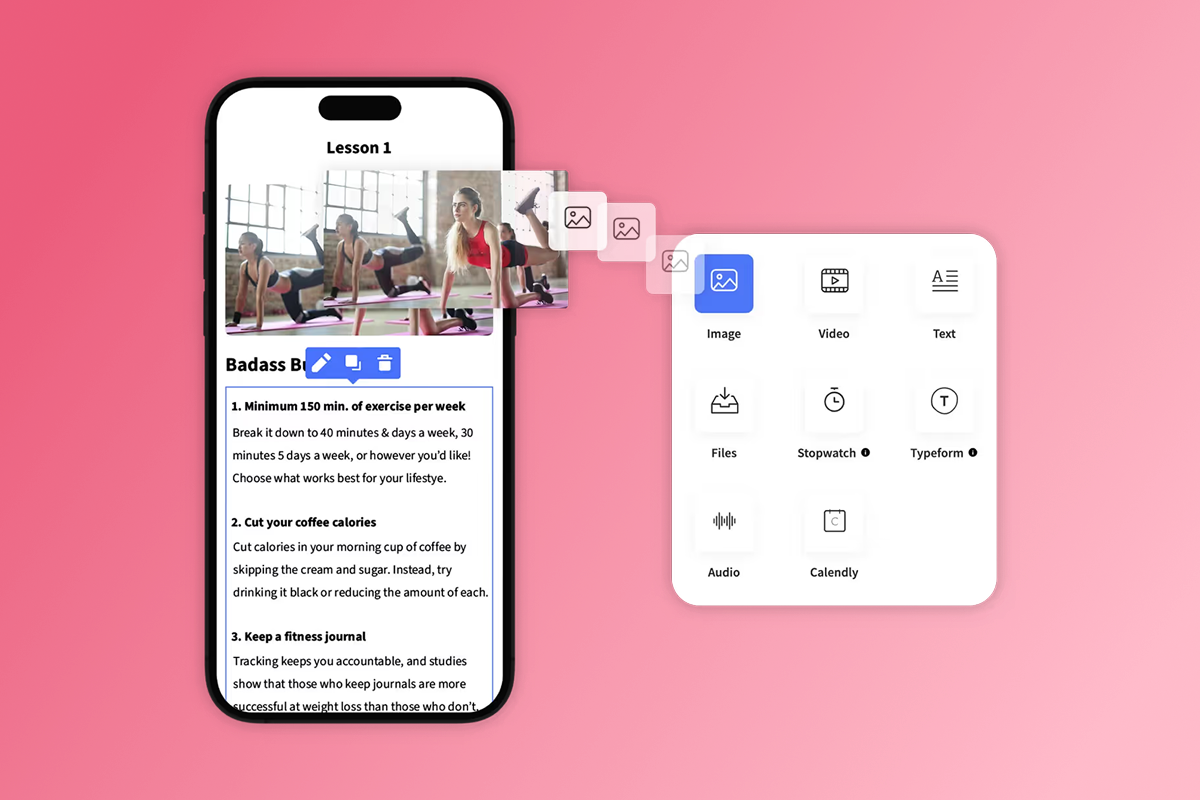
In Passion's drag-and-drop builder, you select templates, upload videos, audio files, PDFs, and text, then arrange them into logical sequences. The platform supports drip content, releasing lessons on a schedule to prevent overwhelm.
"Passion makes building your own e-learning app fast, simple, and stress-free. With their no-code, drag-and-drop platform, I was able to design, build, and launch a fully functional app in just a few hours—no tech experience required." - Rob M. on G2 review
Step 2: Add interactive elements and drip content
Static video lectures struggle to hold attention on mobile devices. Add quizzes after each module to reinforce key concepts and provide immediate feedback. Passion includes quizzes, progress tracking, and goal-setting tools to make learning active.
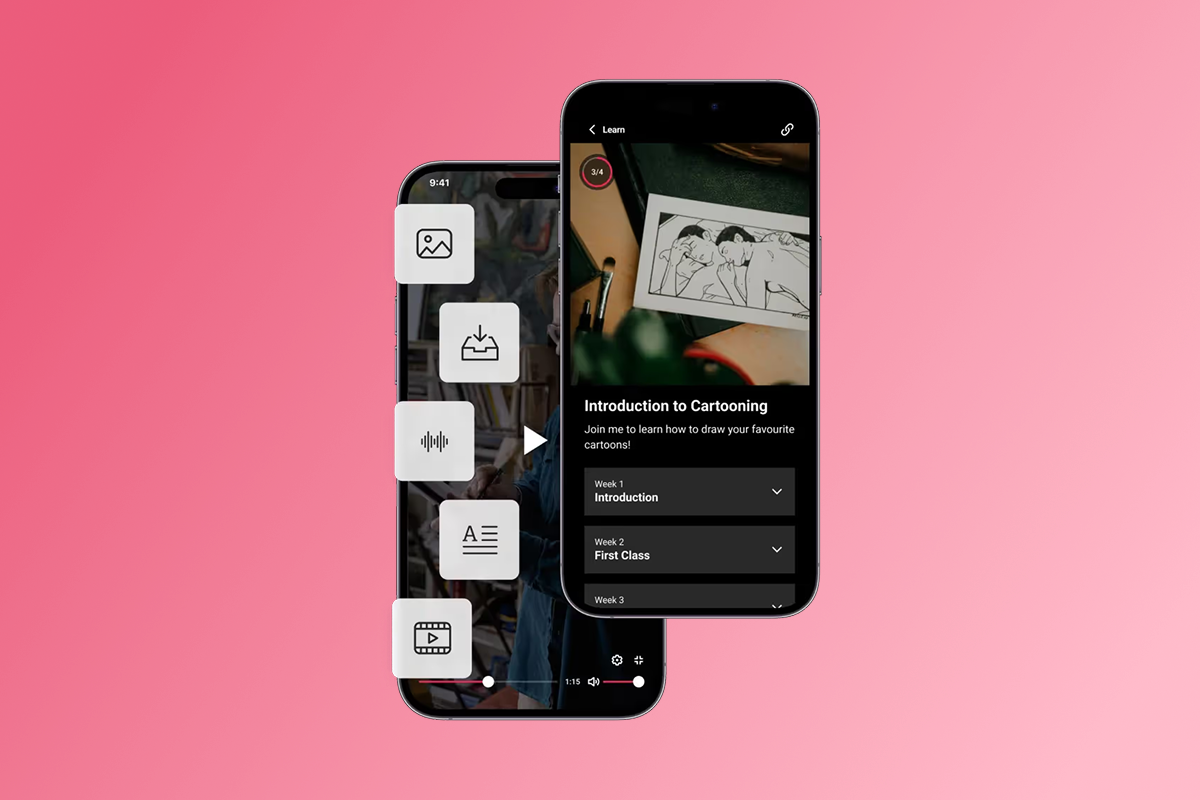
Drip content on a schedule. Release one module per week for a 12-week program. This pacing prevents students from binging and forgetting while creating anticipation.
Add challenges to create milestones. A 30-day fitness challenge with daily video check-ins, a 7-day writing sprint with peer feedback loops, or a 21-day aerial conditioning series with technique milestones gives students a shared goal and a reason to check the app daily. Challenges paired with push notifications drive daily active users and create community momentum.
Step 3: Brand your app for a premium experience
In Passion's builder, you upload your logo, select brand colors, and customize fonts. The app displays your branding on the splash screen, navigation, and every lesson page.
A cohesive visual identity increases perceived value, which justifies premium pricing. Premium-priced courses above $200 tend to have higher completion rates because buyers are more invested.
Create a welcome video that plays when students first open the app, introducing yourself and setting expectations. On higher Passion plans like Scale and Expand, you remove Passion branding entirely. For established creators, the Plus plan includes white-glove branding and submission support.
How to monetize your online courses for predictable recurring revenue
Monetization strategy directly impacts your margins and scalability. Most creators see strong profit margins once operational costs are covered.
Choosing your pricing model: Subscriptions, one-time, or bundles

- We recommend subscriptions for predictable recurring revenue. Charge $29/month or $297/year for ongoing access to your course library, live Q&A sessions, and community. This model works best for content requiring continuous learning.
- One-time purchases provide bulk revenue upfront. Price a flagship course at $497 or $997 for lifetime access. This suits courses with a clear beginning and end, like certification programs.
- Tiered pricing captures both markets. Offer a self-paced course at $297, a coaching tier with live sessions at $997, and a VIP tier with one-on-one support at $2,000. Tiered models increase average revenue per customer by catering to different budgets.
- Bundles increase transaction size. Package three related courses at $497 versus $197 each. Bundles work well when selling via web checkout to avoid Apple and Google's in-app purchase fees.
Navigating payment gateways: PassionPayments vs. in-app purchases (IAP)
Passion offers two primary payment paths with different fee structures.
- PassionPayments (web checkout) charges a 3.9% platform fee plus Stripe's standard processing fees (2.9% + $0.30 per transaction). Use this for subscriptions, bundles, and higher-priced offers where margin matters. Students purchase through a web-based checkout page accessed via link.
- In-app purchases (IAP) through Apple and Google retain 15-30% of the transaction. Under the Small Business Program, it's 15% for developers earning under $1 million annually. Use IAP for convenience purchases and frictionless checkout directly in the native app. Students purchase without leaving the app using their Apple ID or Google Play payment methods.
- External checkouts incur 0% Passion platform fee (payment processor fees still apply). Available on certain plans, this allows you to process payments independently while still granting app access.
Understanding fees and improving your margins
Beyond payment processing, account for these costs:
Developer program fees:
- Apple Developer Program: $99/year
- Google Play Developer: $25 one-time
You must open these accounts to publish your app on the App Store and Google Play.
Passion plan costs:
According to third-party pricing analysis, monthly plans range from Launch at $119/month ($99/month annually) to Expand at $699/month ($599/month annually). The Plus plan typically costs $10,000-$20,000 for white-glove onboarding, then ongoing SaaS fees.
Total cost of ownership example (12 months, Expand plan):
- Expand plan (annual): $7,188
- Apple Developer: $99
- Google Play: $25
- Total platform cost: $7,312
Compare this to custom app development quotes starting at $30,000 and 6+ months of build time, plus ongoing developer maintenance costs, and the ROI becomes clear.
To improve margins, route high-value offers and bundles through web checkout, reserve IAP for in-app convenience purchases, and use tiered pricing to increase average transaction size. Use Passion's monetization tools to toggle between web checkout and IAP based on the offer type.
How to market and sell your online courses effectively
A great course won't sell itself. You need a clear go-to-market strategy that builds audience, drives enrollments, and retains students.
Launching your branded app: A white-glove approach (Passion Plus)

For established creators, time is the constraint. The Passion Plus plan offers white-glove service, handling app build, content migration, App Store submission, and onboarding in 4-8 weeks.
What Plus includes:
- Done-for-you app design and setup
- Content migration from existing platforms
- App Store and Google Play submission support
- Dedicated success manager for strategy and troubleshooting
- Growth coaching calls to refine monetization
- Advanced analytics and custom reporting
Launch timeline (Plus plan):
- Week 1: Kickoff call, gather brand assets, set pricing
- Week 2-3: Content upload and app design by Passion team
- Week 3: Developer accounts opened, submission prep
- Week 4: Web app live, iOS/Android submissions underway
- Week 5-8: App Store reviews, approvals, and public launch
"What I love about Passion is that it's not just a platform to create your own app – it also provides invaluable training on how to build and sell your course." - Mathilde N. on G2 review
Launch with a seed group. Before a full public launch, enroll 10-30 beta students at a discount. Gather testimonials, refine content based on feedback, and document success stories.
Driving engagement with push notifications and in-app community
Push notifications are a critical advantage of mobile apps over web-only platforms. According to mobile engagement research, creators who use push notifications paired with in-app challenges see 15-30% completion rate lifts within 90 days.
Push cadence best practices:
- Lesson reminders: "Your next lesson is ready. Complete it in 8 minutes."
- Challenge check-ins: "Day 5 of 30: How's your progress on today's task?"
- Community highlights: "3 new discussions in your group. Join the conversation."
- Motivational nudges: "You're 60% through the course. Keep going."
Schedule 2-3 pushes per week. Test timing based on your audience. Morning pushes (7-9 AM) and evening nudges (6-8 PM) often perform best for working professionals. Use Passion's push notification composer to schedule messages in advance and A/B test timing.
In-app community features:
Passion includes in-app community newsfeeds and PowerChat for direct messaging. Create discussion channels for each module, host weekly live threads, and encourage peer-to-peer support. A thriving community reduces churn because students feel accountable to the group.
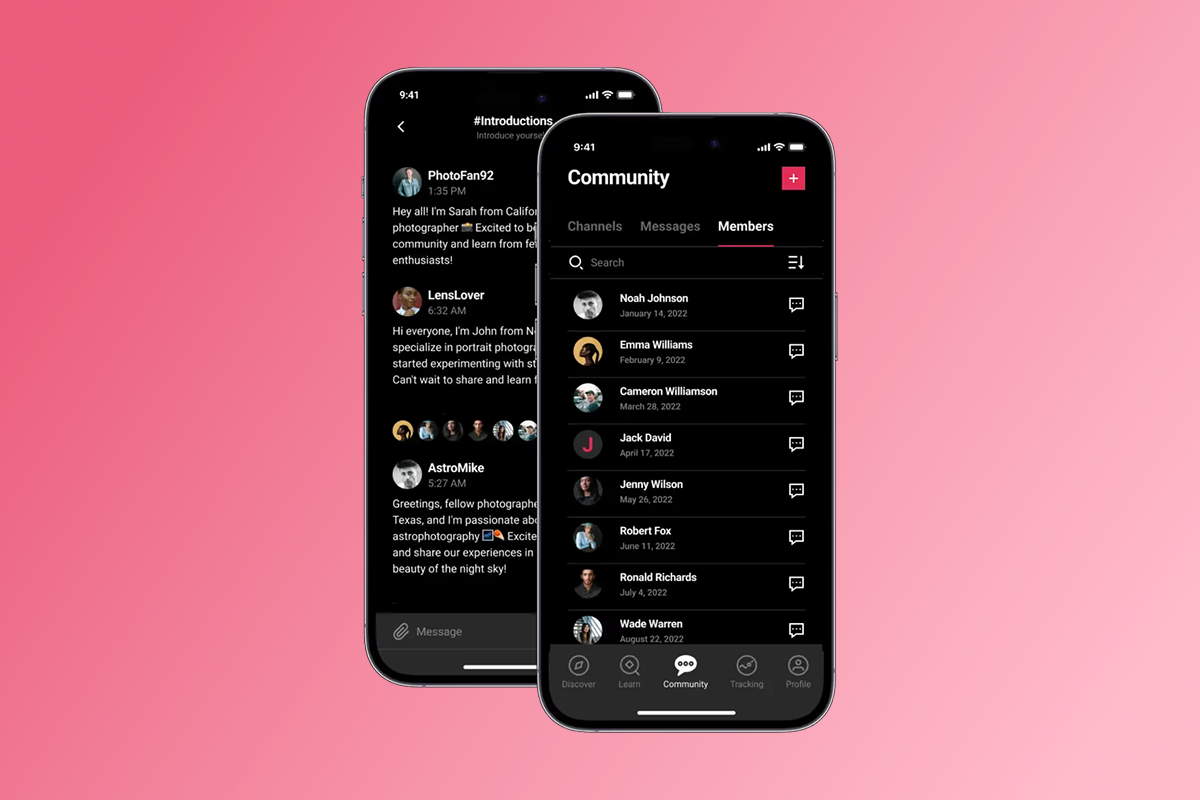
Run a 30-day challenge in Month 2. Pair it with daily push notifications and a leaderboard. Fitness creators have shown that structured challenges drive daily logins and improve completion metrics.
Leveraging integrations for automated workflows
Passion integrates natively with Calendly, Typeform, YouTube, and Vimeo, plus broad Zapier support for hundreds of tools. Connect your email platform to trigger welcome sequences, embed Calendly links for coaching tiers, and set up abandoned cart emails. Automation reduces admin hours by 5-10 per week.
Marketing funnel example:

- Lead magnet: Free mini-course promoted via social media
- Email sequence: 5-email nurture series offering value
- Webinar: Free 45-minute training with a pitch at a discount
- Enrollment: Direct students to web checkout, granting app access
Automated email sequences are among the most effective marketing channels for teachers. Set up abandoned cart emails to recover lost sales. A well-optimized 3-email sequence can recover 10-15% of otherwise lost revenue.
Risks and mitigations for launching your course app
No launch is entirely risk-free, but Passion equips creators with tools and support to navigate common challenges smoothly.
App Store submission delays
Apple and Google manually review apps before approval. While initial reviews typically take 1–3 days, clarifications may occasionally be required.
Common issues:
- Incomplete metadata (missing privacy policy, unclear description)
- In-app purchase setup errors
- Content policy violations
Mitigation:
Passion's Expand and Plus plans include App Store submission support. Their team pre-checks your app for common issues, helping you submit developer accounts in Week 1 and save 7–10 days later. If a rejection occurs, the support team guides you through fixes. Plan a 1–2 week buffer after your web app launch before announcing your iOS/Android release to the public.
"They lay it out clearly and are available for support. The platform is easy to use with clear directions on what to do next." - Michele D. P. on G2 review
Fee Management
Many creators underestimate the impact of in-app purchase (IAP) and payment processing fees on margins.
Common mistakes:
- Pricing a course at $297 without accounting for 30% IAP fees, leaving you with $208 instead of $297
- Not offering web checkout as an alternative
Mitigation:
Passion helps you plan pricing strategically:
- Build fees into your pricing model (e.g., price IAP at $424 to net $297)
- Offer web checkout for high-ticket bundles to protect margins
- Use their fee comparison tools and margin analysis before launch
With clear guidance, pre-checks, and flexible pricing options, Passion ensures creators can launch confidently, minimize delays, and maximize profitability.
Success stories: Teachers thriving with branded apps
Real outcomes from educators who made the leap.
Nicole, Learning and Development Coach:
Nicole built two Passion apps generating multi-six figures annually. She transitioned from live workshops to self-paced programs with branded apps. The Plus plan's content migration, app launch support, and coaching calls enabled her to scale without hiring developers.
Your 30-day branded app launch checklist for online courses
Use this checklist to go from concept to live app in 30 days (web), with App Store submissions underway by Week 4.
Week 1: Foundation and setup
- Define your course topic and validate demand (surveys, competitor research)
- Outline course modules and learning objectives
- Sign up for Passion (Plus plan recommended for established creators)
- Open Apple Developer ($99) and Google Play ($25) accounts
- Gather brand assets: logo, colors, fonts, sample content
- Schedule kickoff call with Passion success manager (Plus plan)
Week 2: Content creation and design
7. Record or migrate 10-15 core lessons (3-10 minutes each)
8. Write lesson descriptions and module introductions
9. Create quizzes or interactive exercises for each module
10. Upload content to Passion builder (or have Plus team migrate)
11. Customize app branding (logo, splash screen, colors)
12. Set up pricing tiers (monthly, annual, one-time, tiered)
Week 3: Monetization and integrations
13. Configure PassionPayments web checkout (Stripe integration)
14. Set up in-app purchase options if using IAP
15. Connect email marketing platform via Zapier
16. Integrate Calendly for coaching tiers (if applicable)
17. Create in-app community channels for discussions
18. Write and schedule 10 push notifications for launch
Week 4: Testing, submission, and launch prep
19. Test all content, payment flows, and navigation
20. Invite 3-5 beta testers to provide feedback
21. Submit iOS and Android apps to stores (Plus team handles this)
22. Launch web app publicly
23. Send launch email to existing list with web app link
24. Post-launch announcement on social media
25. Schedule first live Q&A session or webinar for Week 5
Post-launch (Days 31-90): Engagement and optimization
26. Send 2-3 push notifications per week
27. Monitor completion rates and engagement metrics
28. Gather testimonials from first 10-20 students
29. Adjust content or pacing based on feedback
30. Plan Month 2 challenge to boost daily logins
Track key metrics: enrollments, completion rate, monthly recurring revenue, churn rate, and customer acquisition cost. Target 15-30% completion lift by Day 90 and <2% monthly churn by Month 6.
Own your audience and revenue with a branded mobile app. In 4-8 weeks, you can have your app live on web, iOS, and Android, with push notifications nudging students, in-app community fostering loyalty, and transparent fees protecting your margins. Passion's Plus plan handles the technical complexity so you focus on teaching and scaling.
Book a demo for Passion Plus to explore white-glove app launch, or use the 30-Day Branded App Launch Checklist above to start planning.
Frequently asked questions
How fast can I launch a branded app with Passion?
Web apps go live in 2-3 weeks. iOS and Android submissions typically complete within 4-8 weeks, depending on App Store review times.
What are the total costs for launching my course app?
Expect $99/year for Apple Developer, $25 one-time for Google Play, and Passion plan costs starting at $99/month annually. Payment processing adds 3.9% for PassionPayments web or 15-30% for IAP.
Can I migrate existing course content from another platform?
Yes. Plus plan includes content migration services, or you can manually upload videos, PDFs, and text yourself in 5-10 hours for a 10-module course.
How do I choose between web checkout and in-app purchases?
Use web checkout (PassionPayments) for high-margin flagship offers and bundles. Use IAP for in-app convenience purchases or upsells.
What support does Passion offer for non-technical creators?
We offer 24/7 support, training resources, and on Plus plans, a dedicated success manager. G2 reviewers consistently praise our support team's responsiveness and training on course creation.
Key terms glossary
Branded app: A mobile application (iOS, Android) and web platform displaying your logo, colors, and brand identity, published under your name in app stores.
PassionPayments: Passion's payment processing system for web-based checkouts, charging a 3.9% platform fee plus Stripe's standard fees.
In-app purchases (IAP): Purchases made directly within native iOS or Android apps, where Apple or Google retains 15-30% of revenue and handles billing.
Push notifications: Messages sent directly to students' mobile devices to re-engage them with lessons, community activity, or challenges.
Drip content: Releasing course lessons on a schedule (e.g., one module per week) rather than all at once.
MRR (Monthly Recurring Revenue): Predictable monthly income from subscriptions or recurring memberships.

Build the business
behind what you know.
Turn your expertise into a branded app with courses, community, and the You AI Coach. Launch plan from $99/month.