
Updated 17th December, 2025
Creators with 47,000 followers upload content five times across platforms. They process $8,750 monthly through Patreon but lose $875 to platform fees. Discord buries notifications. Zoom links expire mid-session. Facebook Groups split conversations from courses. Administrative overhead consumes 12 hours weekly. This tool sprawl across Instagram, Patreon, Discord, Stripe, and Zoom fragments the member experience while platform fees compound across each service.
Consolidated branded apps recapture this lost revenue.
Patreon serves hundreds of thousands of creators globally, but platform dependency, limited engagement tools, and fee structures push many to seek alternatives. This guide shows how building your own branded mobile and web app consolidates content, community, and payments into a mobile-first experience you own, without writing code.
Why do creators seek Patreon alternatives?
Creators leave Patreon or avoid it entirely for three core reasons: platform dependency erodes control, engagement tools fall short of mobile-first expectations, and hidden costs from tool sprawl add up.
The limitations of "rented land" platforms
Patreon and similar membership platforms operate as intermediaries. You build an audience, but the platform controls access, monetization rules, and the user experience. Policy shifts can instantly throttle your reach or revenue. When you don't own the infrastructure, you don't control your business destiny.
Platform fees typically range from 5-12% depending on plan tier, plus payment processing costs around 2.9% + $0.30 per transaction. On a $1,000 month, you pay $50-$120 in platform fees and $29-$30 in processing fees. You have no control over future pricing or policy changes. Note: Patreon faced creator backlash in 2017-2018 over fee restructuring and in 2021 over content moderation policies, driving some creators to seek alternatives with clearer policies and less platform risk.
The desire for deeper engagement and ownership
Web-first platforms like Patreon deliver content through browsers or basic mobile wrappers. They lack native push notifications, offline content access, and the immersive in-app community features that drive daily active usage. Mobile users navigate apps differently than websites, expecting gesture-based interactions and immediate access that web platforms don't deliver natively.
Push Notifications drive retention. When you launch a challenge or release new content, a notification brings members back instantly. Industry studies show email open rates average 20-30%, while mobile push notifications consistently achieve higher engagement. Our platform data shows creators using push notifications and weekly challenges often see completion rates increase by 15-30% within 90 days.
Creators also want data ownership. When you control your app, you own customer email lists, usage analytics, and the entire member experience. You can export data, adjust pricing, and build long-term value independent of third-party platform decisions.
"I like that there's an easy to follow system to not only build your App but also your Business." - Emmely C. on G2
The hidden costs of fragmented tools

A typical creator manages Instagram or TikTok for marketing, Patreon for memberships, Zoom for live sessions, Facebook Groups for community, Google Drive for resources, and Stripe or PayPal for additional sales. Each tool carries monthly fees, learning curves, and integration headaches. Tool sprawl creates operational drag, increases support burden, and fragments the member experience.
The true cost isn't just subscription fees. It's the hours spent answering "Where do I find X?" support tickets, the lost engagement from scattered touchpoints, and the churn from a disjointed user experience.
How do I choose the right Patreon alternative for my business?
Before evaluating specific platforms, clarify your business model, engagement priorities, and operational requirements. The best Patreon alternative aligns with how you monetize, how your audience consumes content, and what level of control you need.
Identify your core monetization model
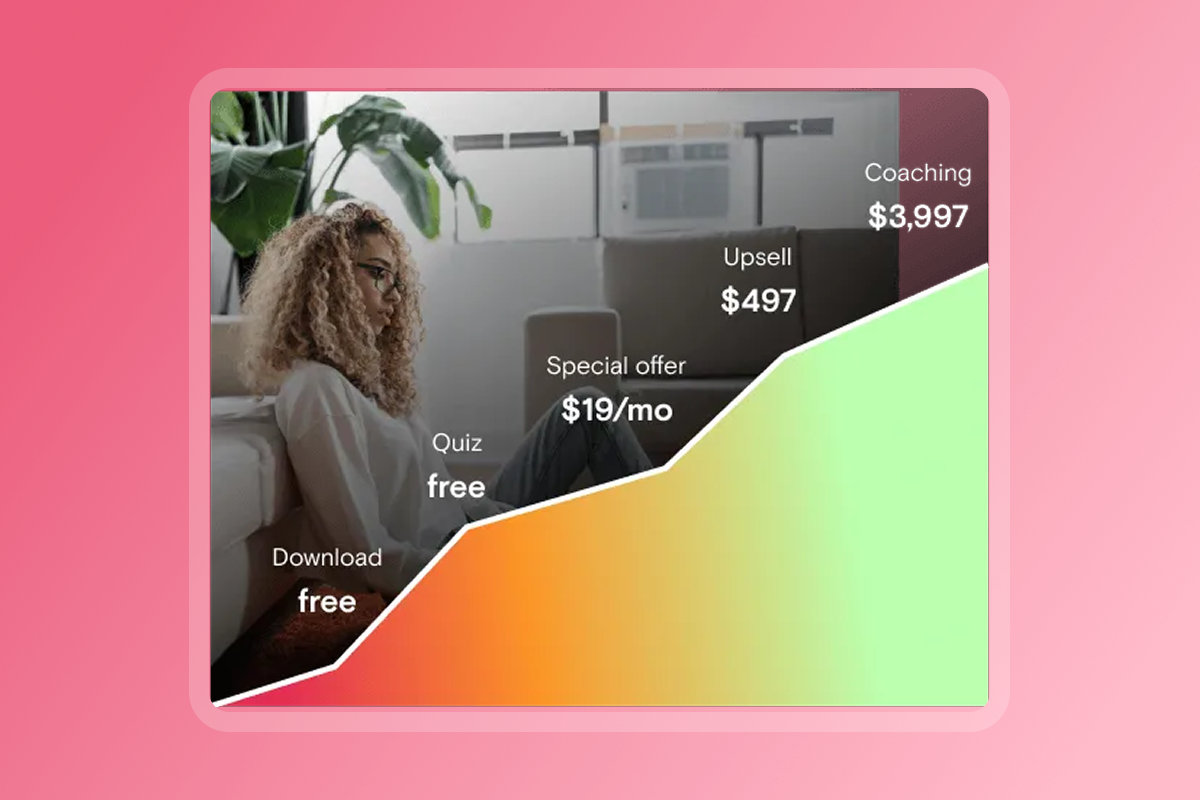
Different platforms excel at different revenue models. Match the platform to your offer structure.
Fitness trainers benefit from short-term challenges with upsells to ongoing programs. Artists monetize through tutorial libraries with community feedback. Mindset coaches combine drip content with live Q&A and accountability pods. Business coaches structure tiers around group access and 1-on-1 reviews.
We support weekly, monthly, and annual subscriptions, plus one-time purchases and bundles. This hybrid approach works for membership models with courses, community, and occasional workshops, reducing the need for multiple tools.
Prioritize mobile-first engagement
Your audience lives on mobile devices. Native mobile apps built on platforms like ours allow members to download lessons and access them without connectivity, a feature web apps cannot match. Offline access matters for fitness trainers, meditation coaches, and anyone whose audience consumes content in gyms, studios, or while traveling.
In-app community features—threaded discussions, direct messaging, member profiles—create daily engagement loops. When community lives inside the same app as content, members interact more frequently than when you split community into Facebook Groups or Discord servers.
Evaluate audience ownership and data control
Many creators seek alternatives specifically to own their customer relationships. Ask these questions:
Can you export your full member list with emails and engagement data? Do you control pricing changes, or does the platform dictate fee structures? Can you add custom integrations, analytics, or third-party tools? What happens if the platform shuts down, changes policies, or increases fees?
We give you branded iOS, Android, and web apps where you control the user experience, pricing, and data. You're not building on rented land.
"Passion.io helped me turn my vision into a fully branded app that inspires equestrian women daily." - Jenna Knudsen on Trustpilot
Compare fee structures and total cost of ownership

Hidden fees destroy margins. Compare platform subscription costs, transaction fees, payment processing fees, and app store percentages.
Patreon charges 5-12% of your earnings depending on your plan, plus payment processing fees (roughly 2.9% + $0.30 per transaction). On a $1,000 month, you pay $50-$120 to Patreon and $29-$30 in processing fees.
We use a different model. Monthly subscription plans range from $119/month (Launch plan, $99/month annually) to $699/month (Expand plan, $599/month annually). PassionPayments charges a 3.9% platform fee on web checkouts, plus Stripe's standard processing. In-app purchases through Apple or Google incur 15-30% fees from Apple/Google, but we add no additional platform fee on top of that.
Critical distinction: When you process payments through external processors like Stripe or PayPal outside the app, we charge no platform fees. This gives you maximum margin flexibility on high-value bundles or existing checkout infrastructure.
Additional costs: Apple Developer Program runs $99/year, Google Play Developer costs $25 one-time. Factor these into your total cost of ownership.
Checklist: Persona Needs vs. Platform Features
*Kajabi and Thinkific offer different feature sets and pricing. This comparison reflects typical capabilities across their mid-tier plans.
What are the best Patreon alternatives and how do they compare?
Creators have dozens of alternatives to Patreon. The best choice depends on whether you prioritize web simplicity, video delivery, community, or a branded mobile app experience.
Patreon: the baseline
Hundreds of thousands of creators use Patreon, attracted by name recognition and a built-in discovery network. You publish posts, videos, audio, and polls. Supporters pay monthly tiers for access.
- Strengths: Easy setup, existing user base, simple tier structure, integrations with Discord and YouTube.
- Limitations: Platform fees run 5-12%, you don't own the app experience, no native push notifications, limited mobile engagement features, and you're dependent on Patreon's policies and uptime.
Web-first platforms (Ko-fi, Substack, Ghost)
Ko-fi offers low platform fees and serves over a million creators globally. You set up a donation page, sell digital products, and offer memberships. Substack charges 10% platform fees and focuses on newsletters with paid subscriptions. Ghost is an open-source publishing platform popular with independent publishers.
- Strengths: Low or zero platform fees, quick setup, strong for written content and simple digital sales.
- Limitations: No native mobile apps. No push notifications. Limited community features. Ko-fi's interface is simple but lacks depth for structured courses or challenges. Substack's discovery features face criticism for weak content indexing. These platforms work for newsletter writers and simple digital product sellers but fall short for mobile-first coaching and course delivery.
Video-centric and community platforms
Uscreen targets video creators who want Netflix-style streaming apps, with pricing often starting around $99-$200+/month. Strong for video delivery but less flexible for courses with PDFs, quizzes, and text content.
Mighty Networks combines courses, community, and live events in a branded space, with pricing starting at $33-$99+/month. Robust community features and native mobile apps, though course features are less comprehensive than dedicated platforms.
Passion: the branded app advantage
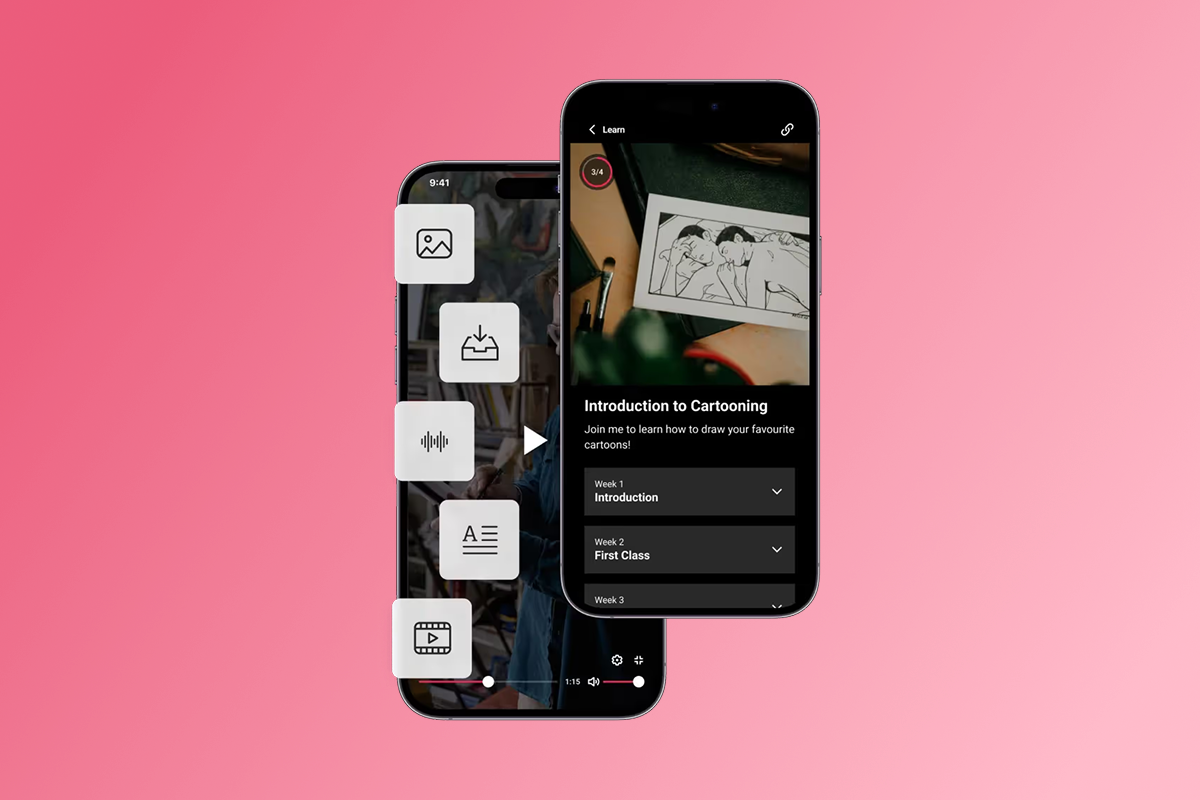
We give you a real branded mobile app (iOS, Android, and web) with courses, community, push notifications, and flexible monetization, all without coding.
Strengths:
- No-code drag-and-drop builder for interactive courses with video, audio, PDFs, quizzes, and drip content. Watch a walkthrough showing setup in under an hour.
- Native push notifications that drive engagement. Creators using push and challenges often see completion increase by 15-30% within 90 days based on our platform data.
- In-app community with discussion threads, direct messaging, and member profiles, keeping engagement inside your app.
- Flexible monetization: subscriptions (weekly, monthly, annual), one-time purchases, bundles, and freemium access. PassionPayments handles web checkouts at 3.9%. In-app purchases support Apple/Google (15-30% IAP fees, no additional fee from us).
- Training and playbooks: Our go-to-market training includes programs like the Expert Unleashed Challenge and Passion Academy.
"What I love about Passion is that it's not just a platform to create your own app – it also provides invaluable training on how to build and sell your course." - Mathilde N. on G2
- App store submission support on Expand and Plus plans. Launch plans require DIY submission with provided checklists.
Limitations: Launch plan starts at $119/month ($99/month annually), higher than free web platforms. Early-stage creators generating under $1,000/month may find this cost higher than web-only alternatives, though the engagement and ownership benefits often justify the investment as revenue grows. Feature gates exist across tiers (drip content, white-labeling, unlimited users).
Best for: Coaches, educators, and creators who want mobile-first engagement, audience ownership, and predictable recurring revenue without hiring developers. Ideal for fitness trainers, wellness coaches, business coaches, and skills educators.
Comparison Table: Key Patreon Alternatives
How do I build a high-engagement app without coding?
We consolidate content, community, and payments into a no-code branded app you control. Here's how you launch and grow.
Launch your branded app in weeks, not months
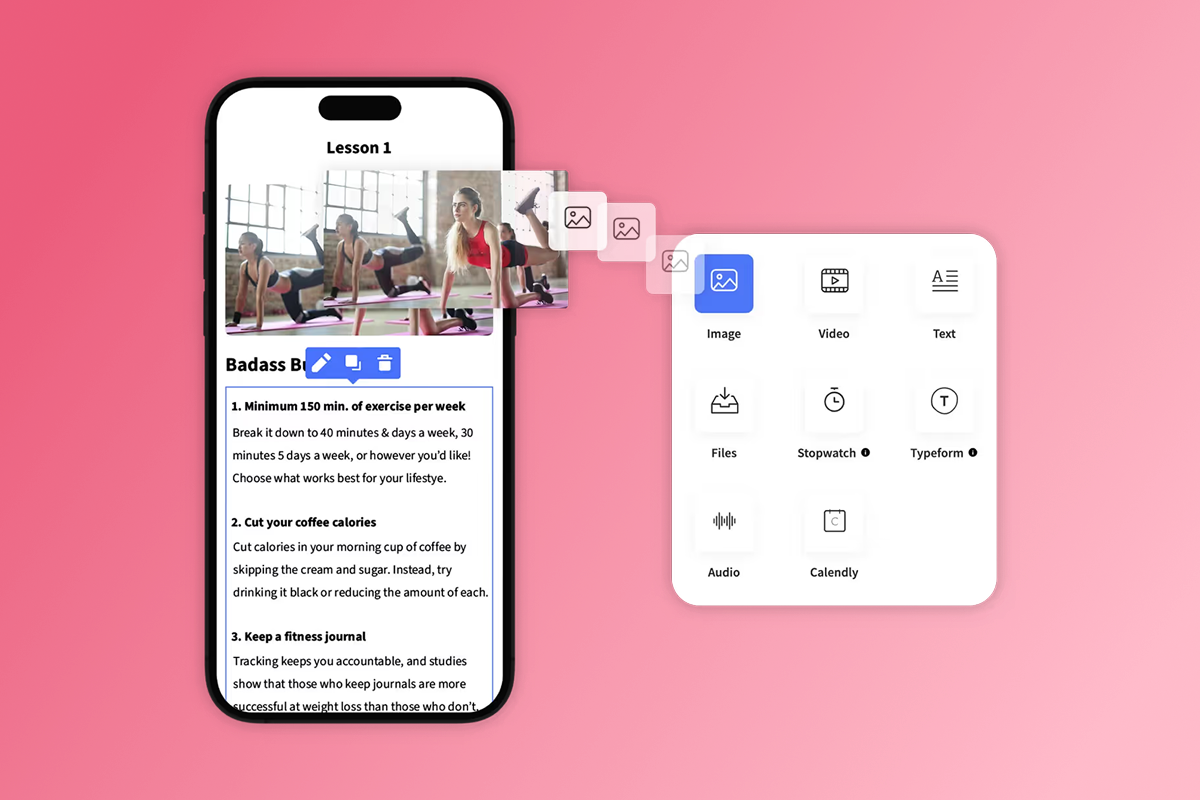
Custom app development costs tens of thousands and takes months. Our drag-and-drop builder lets non-technical creators publish functional apps in weeks.
1. Choose a template and customize branding. Pick from pre-built templates for fitness, coaching, education, or community. Add your logo, colors, and fonts.
2. Upload and structure content. Drag in videos, audio files, PDFs, and text. Organize content into lessons and modules. Add quizzes, timers, and goal tracking. Offline access lets members download lessons and watch without connectivity.
3. Set pricing and checkout options. Configure subscriptions, one-time purchases, and freemium tiers. Turn on PassionPayments for web checkouts or connect Apple/Google in-app purchases for mobile convenience. PassionPayments charges 3.9% on web sales, plus Stripe's standard processing. Apple/Google IAP fees run 15% for developers earning under $1M annually (Small Business Program) or 30% above that threshold. Google offers 15% on first $1M regardless of total revenue.
Risk: IAP fees can squeeze margins on low-price tiers. Mitigation: Route core subscriptions through PassionPayments web checkout and reserve IAP for convenience upsells or higher-price products where 15-30% fees matter less.
4. Publish your web app and submit to app stores. Your web app goes live immediately. iOS and Android submissions require developer accounts (Apple $99/year, Google $25 one-time). Expand and Plus plans include submission support. Launch and Scale plans provide checklists for DIY submission. Learn how to avoid app store rejection with our guidance.
Risk: App Store reviews can request clarifications or changes, which may add 1-2 weeks. Mitigation: Start with your web app, communicate there while app reviews process, and continue onboarding.
Timeline: Web app live in 2 weeks. App store submissions underway by Week 3-4. First approvals typically within 24-48 hours for Apple and several days for Google Play for straightforward apps, though complex reviews may take longer.
Drive engagement with mobile-first features
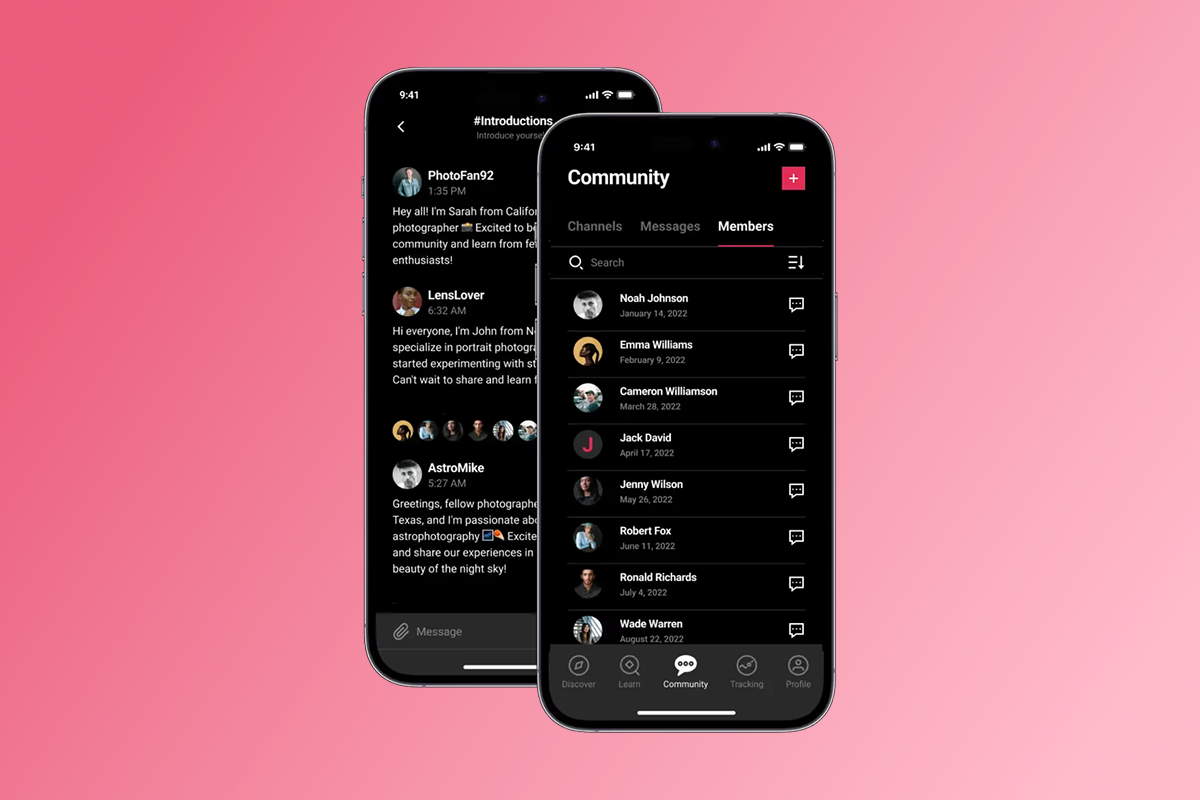
Our mobile-first features keep members engaged between content releases, building daily habits and reducing churn.
- Push notifications: Schedule weekly nudges for new content, challenge checkpoints, and community highlights. A fitness trainer sends a push reminder 30 minutes before the daily workout window closes. A meditation coach nudges members at 6 AM for their morning practice. An aerial arts instructor alerts students when new tutorial breakdowns go live. Our platform data shows creators using push and challenges often see completion increase by 15-30% within 90 days.
- Risk: Over-notification causes opt-outs. Mitigation: Start with 2 pushes per week (one content, one community), measure open rates, and adjust based on engagement data.
- In-app community: Discussion threads, private messaging, and member profiles live inside your app. Members return for conversations, not just lessons, creating retention through social connection.
- Challenges and goals: Run 7-day, 21-day, or 30-day challenges with daily tasks and progress tracking. A wellness coach running a 30-day morning routine challenge can see engagement lift within weeks. A business coach using a 7-day framework implementation challenge typically sees improved completion rates. Challenges create urgency, accountability, and visible progress.
- Offline access: Members download lessons and consume content in gyms, studios, or during commutes without connectivity. This feature, standard in native apps, is impossible on web-only platforms.
- Integration options: Connect Calendly for scheduling, Typeform for quizzes, YouTube/Vimeo for video hosting, and Zapier for workflow automation.
Monetize with flexible subscriptions and payments

We support multiple revenue models so you can test pricing, upsell, and grow MRR.
- Subscription tiers: Offer weekly, monthly, and annual plans. A yoga instructor offers weekly ($12) for drop-ins, monthly ($39) for regular practice, and annual ($399) for committed students. A business coach structures tiers at $79/month for group access and $299/month for 1-on-1 reviews. Annual plans reduce churn and improve cash flow. Creators focused on recurring revenue growth prioritize annual subscriptions with 1-2 month discounts.
- One-time purchases and freemium: Sell individual courses, workshops, or digital downloads alongside subscriptions. Offer free content to build trust, then gate premium lessons, challenges, and community behind paid tiers. Freemium models typically increase trial-to-paid conversion by making value visible before commitment.
- Pricing strategy: On a $29/month plan sold via PassionPayments, you pay 3.9% ($1.13) + Stripe fees ($0.87 + $0.30). Net revenue: ~$26.70. On the same plan via Apple IAP at 15%, Apple retains $4.35. Net revenue: $24.65. Choose based on where your audience converts.
Training and support for your growth
We differentiate ourselves with go-to-market training and responsive support, not just software.
Expert Unleashed Challenge: A free training program teaching offer structure, pricing, and launch tactics. Creators credit this training for sales outcomes, not just app functionality.
App Success Advisors: Users on higher-tier plans receive onboarding calls and ongoing support.
"Since signing up three days ago, I have had a VIP experience. From the fast response to an earlier question I had about billing to the wonderful welcome call I had with Amanda S. (one of the App Success Advisors) who answered all of my questions with kindness and enthusiasm, I feel well taken care of." - Deane Falcon on Trustpilot
Responsive support: Users consistently note helpful and available support teams. One reviewer shared:
"They lay it out clearly and are available for support." - Michele D. P. on G2
This matters during app store submission, payment setup, and launch.
What does a successful 90-day app launch look like?
A structured launch plan moves you from setup to steady MRR in 90 days. Based on our platform data and creator onboarding patterns, here's a proven timeline that works.
Day 1-30: setup and content migration
- Week 1: Sign up for one of our plans (Launch, Scale, or Expand based on your audience size and feature needs). Open Apple Developer ($99/year) and Google Play Developer ($25 one-time) accounts if targeting app stores.
- Week 2: Upload your 10-15 core lessons. Structure them into modules with clear learning outcomes. Add one quiz or interactive element per module.
- Week 3: Set your pricing. Choose one monthly tier ($29-$99) and one annual tier (10-month discount). Configure PassionPayments for web checkout. Test the purchase flow on desktop and mobile.
- Week 4: Design your app branding. Publish your web app. Share the web link with 5-10 beta users for feedback. Submit your iOS and Android apps for review (or follow DIY checklists if on Launch/Scale).
Day 31-60: launch and initial engagement
- Week 5-6: Launch publicly. Announce your app to your email list, social followers, and existing community. Drive initial sign-ups with a launch offer.
- Week 7: Schedule your first push notification campaign. Send two push messages per week: one for new content, one for community engagement.
- Week 8: Launch a 7-day or 14-day challenge inside your app. Track daily active users (DAU) and completion rates in your analytics.
Day 61-90: optimize for retention and recurring revenue
- Week 9-10: Analyze completion data. Identify lessons with high drop-off. Add push reminders before those lessons or insert shorter "quick win" content. Use micro-learning strategies to help busy clients.
- Week 11: Survey your members (in-app poll or Typeform integration). Ask what content they want next, what's working, and where they feel stuck.
- Week 12: Launch your first upsell. Offer a one-time workshop, 1-on-1 coaching session, or advanced module at $99-$299. Target members who completed 50%+ of core content.
- Scorecard: Target +20% completion by Day 90, <5% monthly churn by Month 6, +15% MRR from initial launch baseline. These targets reflect typical creator outcomes and vary based on niche, content quality, and engagement effort.
Own your audience and revenue with your branded app
Platform dependency, limited engagement tools, and hidden costs push creators toward branded apps they control. Building a high-engagement Patreon alternative without coding is now accessible.
We consolidate content, community, and payments into native mobile apps you brand and own. Launch in weeks, use push notifications and challenges to increase completion, and grow predictable MRR.
Stop renting your audience. Own the app, own the relationship, own the revenue.
Try Passion with a 30-day money-back guarantee or book a demo to see how creators in your niche launch and scale.
Frequently asked questions
Is there a free Patreon alternative with full features?
Free alternatives like Ko-fi offer basic functionality but lack native mobile apps, push notifications, and in-app community. For mobile-first engagement and audience ownership, paid platforms deliver better retention outcomes.
What are the best Patreon alternatives for artists and writers?
Artists and writers prioritizing simplicity and low fees often choose Ko-fi or Substack. For mobile-first engagement, branded apps, and higher completion rates, our platform fits visual artists, writers offering courses, and multimedia creators.
How quickly can I launch a branded app?
Web apps go live in 2 weeks. App store submissions typically process within 24-48 hours for Apple and several days for Google Play for straightforward apps, though complex reviews may take longer.Our submission support on Expand/Plus plans helps navigate the process.
Do I need technical skills to build an app on Passion?
No. Our drag-and-drop builder requires no coding. Upload content, set pricing, and publish.
"Drag and drop and hey presto it's done!!" - Priscilla S. on G2
How much does it cost to build a branded app without coding?
Launch plan starts at $119/month ($99/month annually). Add Apple Developer ($99/year) and Google Play ($25 one-time) fees. Budget $150-$200/month all-in to start.
Key terms glossary
Branded app: A mobile and web application featuring your logo, colors, and branding that you control and distribute under your name.
In-app purchases (IAP): Transactions processed through Apple App Store or Google Play Store, subject to 15-30% platform fees.
PassionPayments: Our web checkout system charging a 3.9% platform fee plus standard Stripe payment processing fees.
Push notifications: Mobile alerts sent directly to users' devices, achieving significantly higher engagement than email.
Tool sprawl: The operational drag from managing multiple disconnected platforms for content, community, payments, and communication.
Monthly recurring revenue (MRR): Predictable monthly income from subscription customers, a key metric for creator business health.
Audience ownership: Direct control over customer data, email lists, and member relationships independent of third-party platform policies.
No-code app builder: A platform allowing non-technical users to create functional mobile and web apps through visual interfaces without programming.